The financial situation
- In Bank, keep "All banks" or tick one or more accounts.
- Under Initial Balance, enter for each account its balance on the start date, read from your bank statement. Left empty, it keeps the balance already recorded; once entered, it is saved on the account when you click Display.
- Set the period with From and To (by default, from 1 January to today).
- Click Display. The Print button appears at the top of the page.
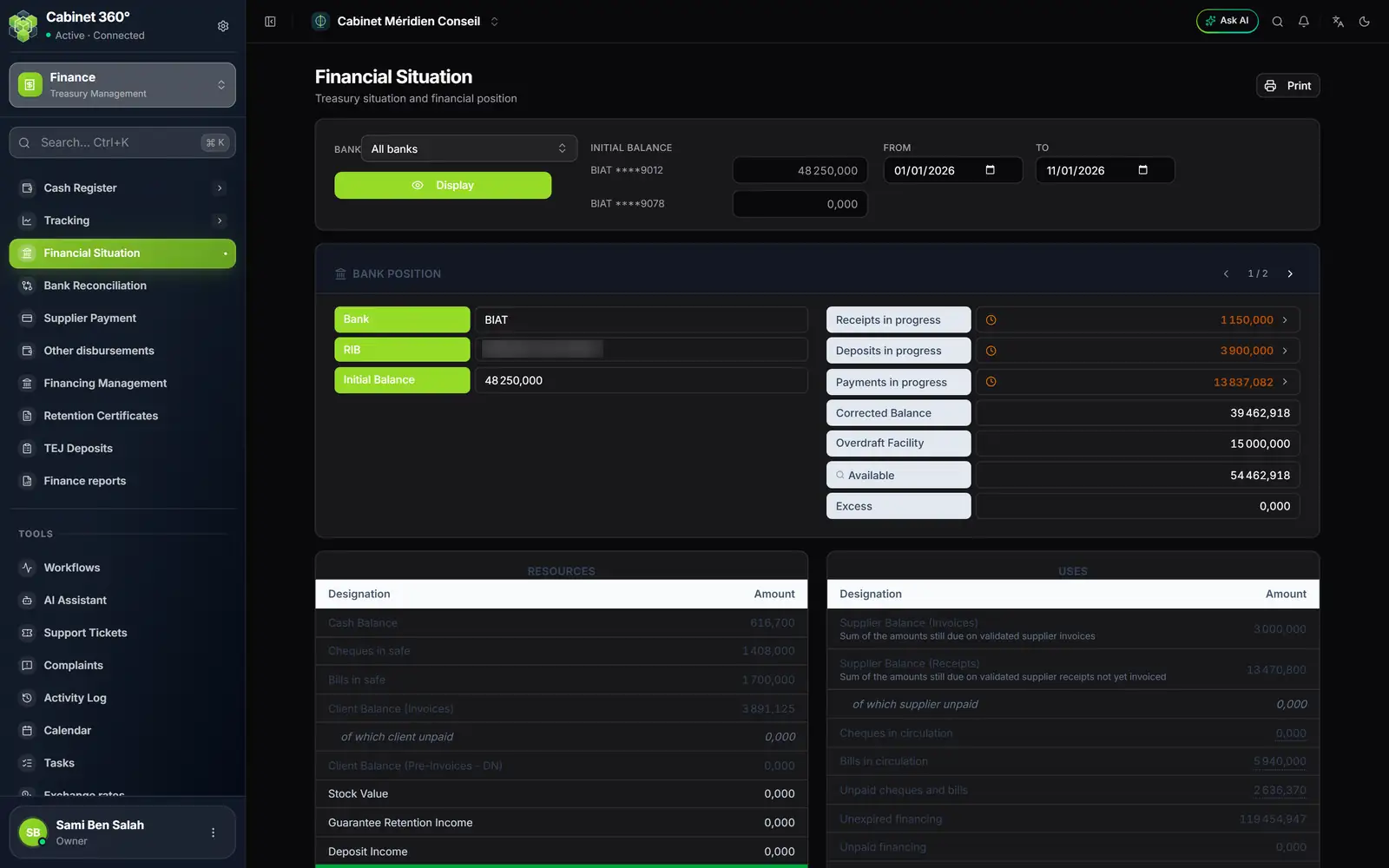
- 1. Bank and Display: one or more accounts, or all banks.
- 2. Initial Balance: one balance per account, read from the statement at the start of the period.
- 3. From, To: the period.
- 4. One bank at a time: the arrows move from one account to the next.
- 5. The "in progress" lines: not yet seen on the statement; a click opens their detail.
- 6. Resources and Uses: what the firm has and expects, against what it owes.
The bank position
For each account (bank, RIB, IBAN):
| Line | What it says |
|---|---|
| Initial Balance | The balance entered for the start of the period. |
| Receipts in progress | Transfers, card and Flouci payments received during the period, not yet seen on the statement. |
| Deposits in progress | Deposits handed to the bank, not yet seen on the statement. |
| Payments in progress | Cash register expenses paid through the bank and cash withdrawals not yet seen on the statement, and validated supplier payment orders whose due date falls within the period, not yet declared paid. |
| Corrected Balance | The initial balance, plus the receipts and deposits in progress, minus the payments in progress. An operation already seen on the statement no longer counts: the initial balance is supposed to include it. |
| Overdraft Facility | The overdraft authorisation in force on the To date, taken from the account's management credit line (Settings › Firm profile › Banks). An account without a management credit line keeps the facility entered by clicking on the amount. |
| Available | Corrected balance plus facility, never below zero. |
| Excess | What exceeds the facility, if anything. |
The three "in progress" lines are the only movements that the corrected balance adds to the initial balance; the total for the whole period shows when you hover over them. A click opens all the operations of the period, the ones in progress first, and the footer checks that they add up to that total.
Resources and uses
Resources — what the firm has or expects:
- Cash Balance, Cheques in safe, Bills in safe (and Other methods tracked in the register if you have any): the content of all the cash registers;
- Client Balance (Invoices) and Client Balance (Pre-Invoices - DN): the clients' balances due, in dinars, including Client Unpaid.
Uses — what the firm owes:
- Supplier Balance (Invoices): the sum of the balances due on validated purchase invoices dated on or before the To date;
- Supplier Balance (Receipts): validated goods receipts not yet invoiced (a receipt leaves this line when its invoice is validated);
- Cheques in circulation, Bills in circulation: the instruments issued whose due date is after the To date;
- Unpaid cheques and bills: those that the tracking declared unpaid, except those already settled by a validated "Unpaid settlement" order;
- Unexpired financing and Unpaid financing: the credit instalments still to be paid (same exception for the unpaid ones).
Double-click Cheques in circulation, Bills in circulation or Unpaid cheques and bills to see the instruments that make up the figure.
The bottom bar, Financial situation, does the sum: resources, minus uses, plus corrected balances. It is green if the result is positive or nil, red otherwise. Filtered on one bank, it says "Not applicable — filtered by bank": resources and uses concern the whole firm.
The Stock Value, guarantee retention and deposit lines are not computed: they always show 0,000.
The printed report
Print opens the print window on the report for the displayed period, in A4 landscape: the logo at the top of each page, the accounts block (one account per line with bank, branch and RIB: initial balance, totals of the period's receipts, deposits and payments — and not the amounts in progress shown on screen —, corrected balance, facility, available, excess; closed by a total), then the resources, the uses and the summary. The footer says "Situation financière arrêtée au dd/mm/yyyy" (financial situation as at that date) and numbers the pages.
The bank reconciliation
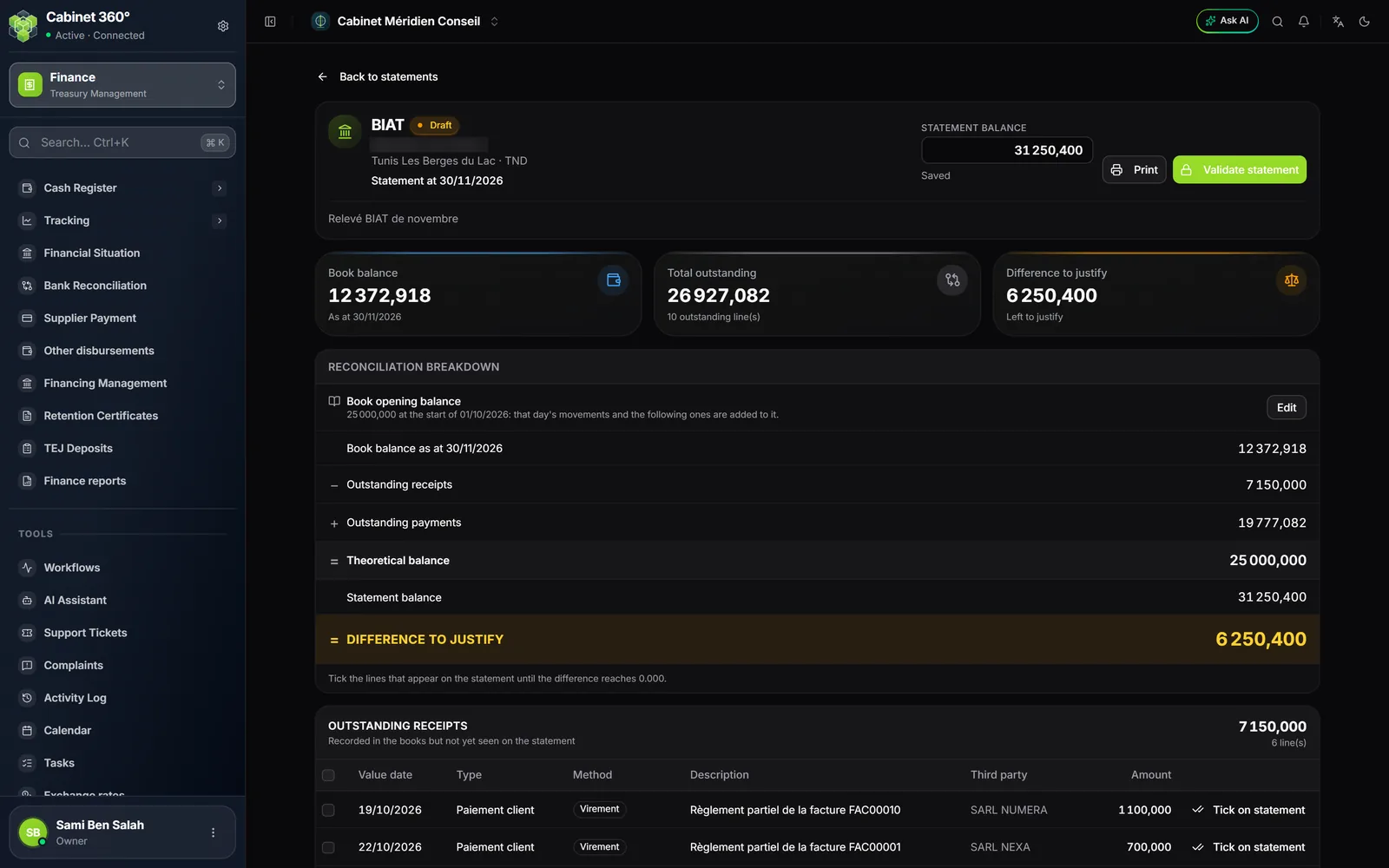
The reconciliation checks one of the firm's accounts against its statement, on a date: you start from the balance in your books, set aside what has not yet gone through the bank, and you must land on the statement balance.
The page lists the statements (Statement date, Bank, Statement balance, Theoretical balance, Difference, Status: Draft or Validated), which can be filtered by bank and by status.
- Click New statement. Choose the Bank, the Statement date and the Statement balance (negative if the account is overdrawn), then Create.
- The first time, fill in the Book opening balance: the balance of this account in your books at the start of a day; that day's movements and the following ones are added to it. As long as it is not filled in, the book balance starts from 0,000.
- Read the Reconciliation breakdown: Book balance as at … − Outstanding receipts + Outstanding payments = Theoretical balance; against the Statement balance, the Difference to justify.
- In the lists below, tick each line that appears on the statement (Tick on statement, or select several lines, then Tick). Payments are sorted into three sub-sections: Cash movements, Supplier payments, Loan instalments taken by the bank.
- When the difference is 0,000 ("Reconciliation balanced"), click Validate statement: its figures are frozen. A statement can also be validated with a difference, which stays frozen as it is. Reopen lets you correct it. Validating and reopening require the right to edit reconciliations.
Print produces the reconciliation statement; while it is a draft, it also carries the detail of the lines not yet ticked.