
One screen for three trackings
The three pages read the same way. An operation starts In progress; you confirm it when you see it on the statement, or you declare it refused. The only exception: in disbursement tracking, a cash register expense paid by transfer is born already Paid, since its method is not tracked; the cheque and the bill of exchange start in progress.
| Tracking | What it follows | In progress | Confirmed | Refused |
|---|---|---|---|---|
| Collections | Transfers, cards and Flouci received | In progress | Collected | Rejected |
| Disbursements | Expenses by bank, payment orders, loan instalments | In progress | Paid | Unpaid |
| Deposits | Deposits of cash, cheques and bills of exchange | In progress | Deposited | Unpaid |
The action is always the same:
- Choose the bank to follow: one card per account of the firm. You follow one bank at a time, as you read one statement at a time.
- Read the cards at the top: the total, then In progress, the confirmed status and the refused status, each with its count and its amount. Oldest says how many days the oldest line in progress has been waiting.
- Click a card to filter the table on that status, or use the filter bar: search, All statuses, All methods, period.
- Check off each line with its menu; Put back in progress undoes a check.
Refresh, at the top right, reloads the bank; Back returns to the choice of bank.
Collection tracking
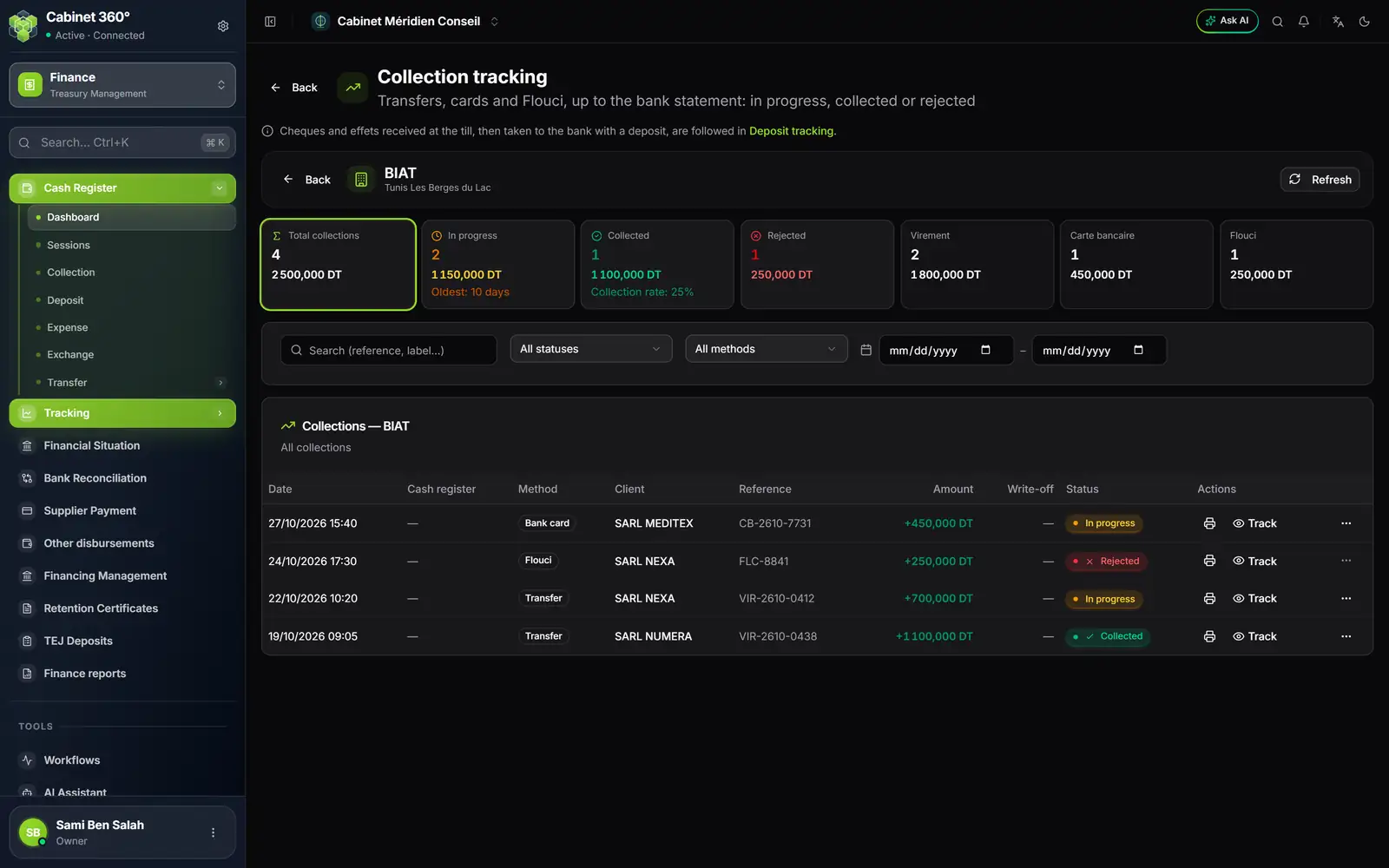
- 1. What it follows: transfers, cards and Flouci, which go directly to the bank.
- 2. The link to deposit tracking: cheques and bills of exchange received in the cash register are followed there.
- 3. The status cards: total, in progress (with the oldest), collected (with the collection rate), rejected.
- 4. One card per method: transfer, bank card, Flouci.
- 5. Actions: print the receipt, and Track to mark it settled or unpaid.
For each line:
- Track (or a double-click on the line) opens the Track the collection window: date, client, method, reference, cash register, amount, status. Settled marks it Collected; Unpaid rejects it. Print the receipt reprints the collection receipt, all its payment lines included.
- Reject (menu ⋯) offers a reason, optional. The rejection cancels the linked payment: the invoice becomes partially paid again and its amount left to pay is restored. You still have to collect from the client again (chapter 4).
- A collected line can still be rejected: a transfer seen on the statement can be taken back by the bank.
- Put back in progress undoes « collected ». A rejection, however, cannot be undone.
Disbursement tracking
This tracking gathers what goes out through the chosen bank (cash withdrawals aside), in three blocks.
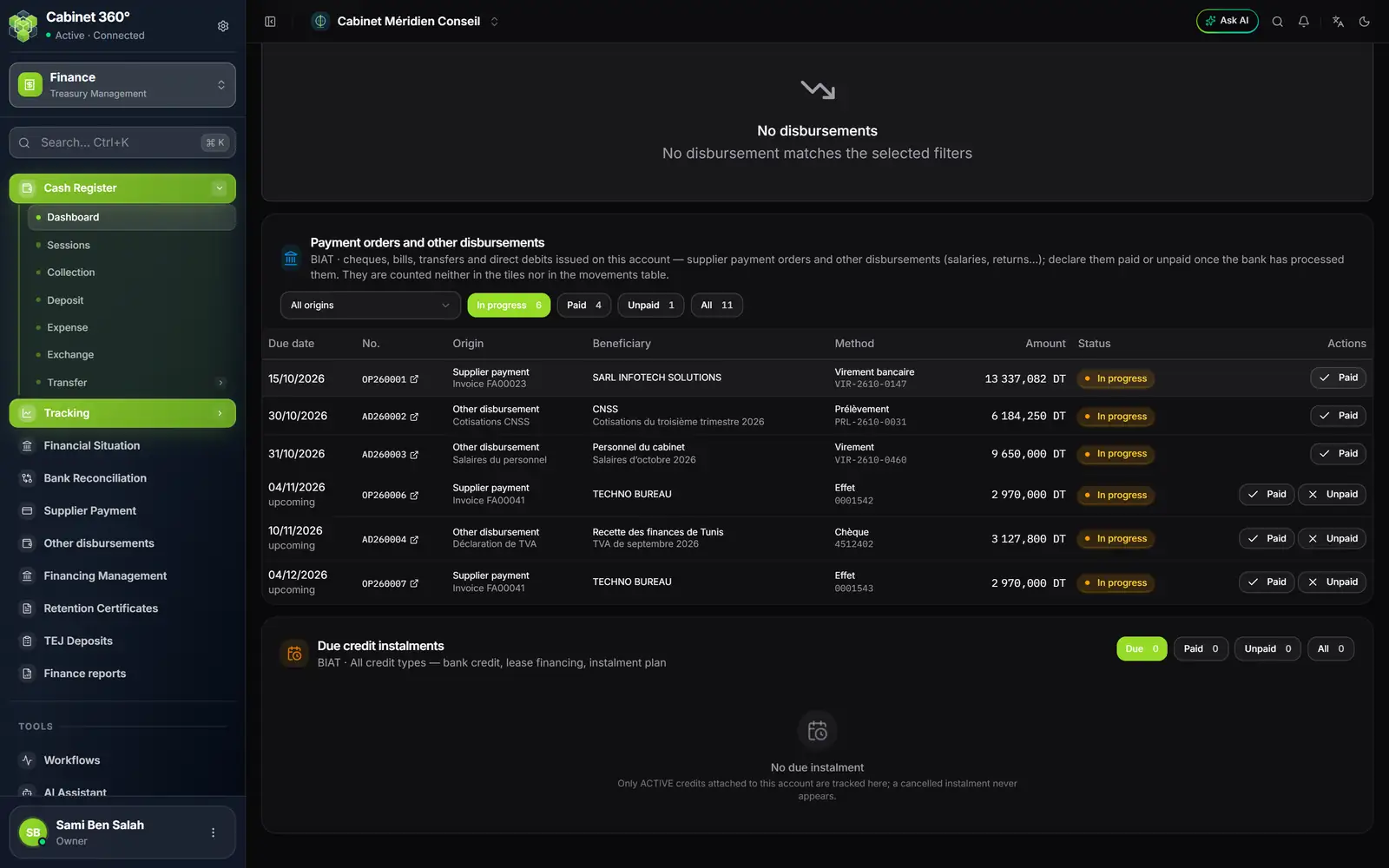
- 1. Payment orders and other disbursements: cheques, bills of exchange, transfers and direct debits issued on this account.
- 2. All origins: supplier payment or other disbursement.
- 3. The status filters: In progress, Paid, Unpaid, All, with their counts.
- 4. Paid / Unpaid: declare what the bank did; « Unpaid » is offered only for cheques and bills of exchange.
- 5. Due credit instalments: the instalments of the active loans drawn on this account.
Cash register expenses paid by the bank
At the top of the page, the table of cash register disbursements: the expenses paid by transfer, cheque or bill of exchange, under the bank that follows them (a cash expense does not appear: the drawer paid it). Actions, per line: Mark as paid, Mark as unpaid (optional reason), Put back in progress; on a selection, only Mark as paid applies in bulk. The total card counts those in progress and those paid; unpaid ones are left out.
Expenses entered before the bank became mandatory, without a bank, are grouped under To assign. Their only action is Assign to a bank, per line or for a selection: they then join the tracking of that bank.
Payment orders and other disbursements
The Payment orders and other disbursements card lists the supplier orders (OP…) and the other disbursements (AD…) validated on this account, sorted by due date: Due date, No., Origin (with the invoice or the expense type), Beneficiary, Method, Amount, Status.
- Paid: the bank has debited. Unpaid: the bank has rejected the cheque or the bill of exchange. A refused transfer, direct debit or card payment is not declared unpaid: you cancel the order and issue a new one.
- A checked line stays on display with its new status and Put back in progress.
- This is the only place where an order becomes paid or unpaid (chapter 8), apart from the take-over of payments in circulation.
Due credit instalments
The Due credit instalments card lists, for the chosen bank, the instalments of the active loans whose date has come (including today's): Due date, Overdue, Credit, Type, Lender, Amount incl. tax, Status. Filters: Due, Paid, Unpaid, All; actions: Paid, Unpaid, Reset.
It is here, and nowhere else, that a loan instalment is declared paid or unpaid: the loan's record only shows its status (chapter 11).
Deposit tracking
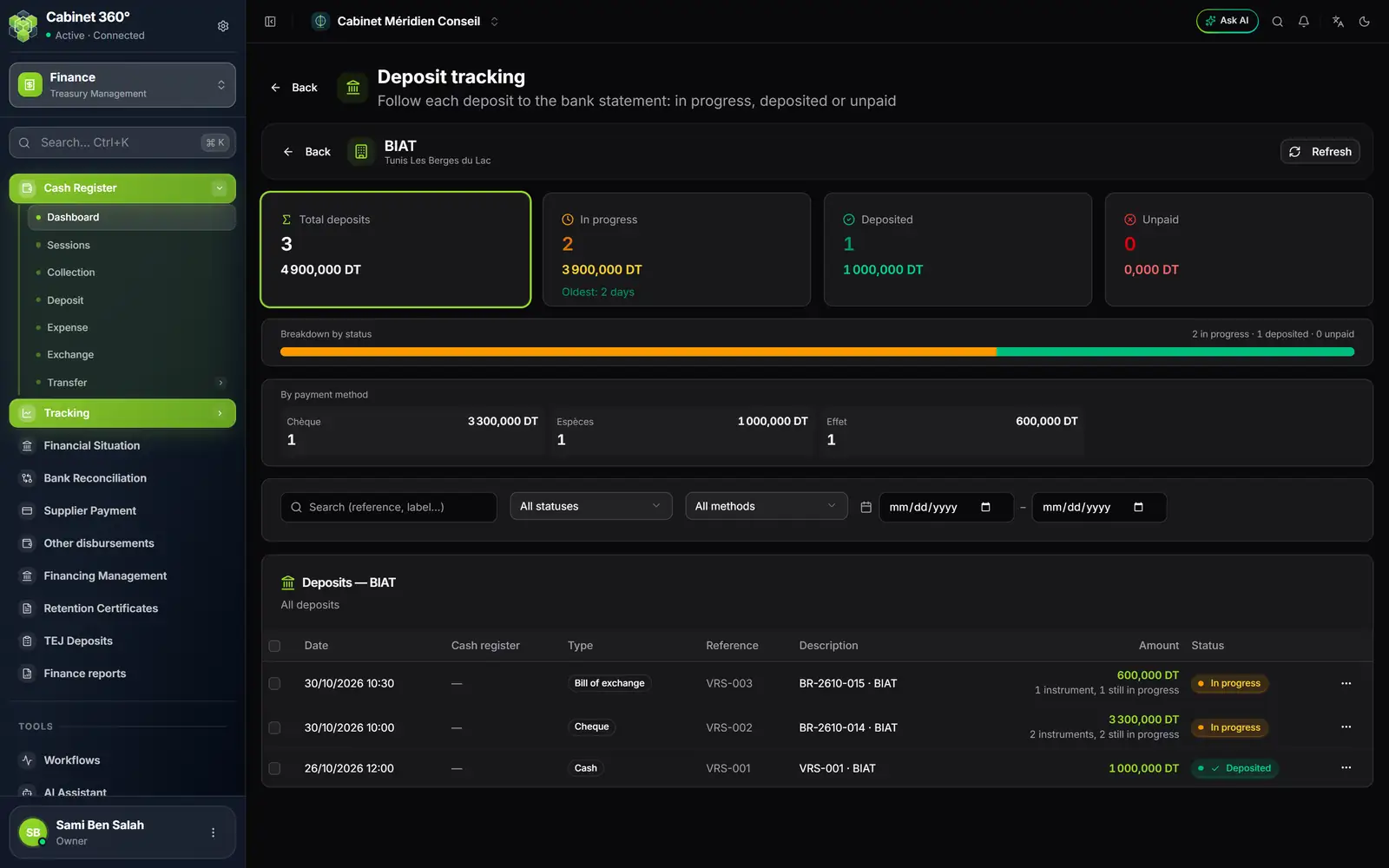
- 1. The cards: total, in progress (with the oldest), deposited, unpaid.
- 2. By payment method: cheques, cash, bills of exchange.
- 3. The amount of a deposit: with the number of items and how many are still in progress.
- 4. The ⋯ menu: view the details, check off the cheques and bills of exchange, mark deposited or unpaid.
A cash deposit is checked off in one action, per line: Mark as deposited, Mark as unpaid (optional reason) or Put back in progress; in bulk, only Mark as deposited.
A deposit of cheques or bills of exchange is checked off item by item: Mark the cheques and bills opens the deposit, with each item and its status (pending, deposited, cleared, rejected). For each one, choose Paid or Unpaid (or All paid, All unpaid), enter if needed the Commission the bank charged on that cheque, then Submit actions. The deposit's status follows that of its items: deposited when all are paid, unpaid as soon as one comes back unpaid, in progress otherwise.
The audit log
The Audit Log page keeps the history of all operations on the cash registers: Date/Time, Action, Cash register, Message, User, IP. Filter by Cash register and by Action type: cash register created, updated or deleted; session opened, closed or cancelled; movement created, updated or deleted; manual adjustment. The Audit log button of the cash register dashboard leads there too.