
Before you collect
- An open folio on the cash register (chapter 3).
- A client document with an amount left to pay: an invoice, a pre-invoice or a quote (Operations book), neither cancelled nor already paid. An invoice still in draft, without a number, is not offered. The cash register offers only the document types ticked on its record (Manage cash registers › Edit › Document types).
- For a transfer, a card or Flouci: the firm's bank account that receives the money.
Choose your cash register under Select a register. The Collections page shows the open folio, four cards (Available cash, Unversed cheques, Unversed effets and their Total unversed), the number of Payments, then the list of the folio's collections.
New collection, step by step
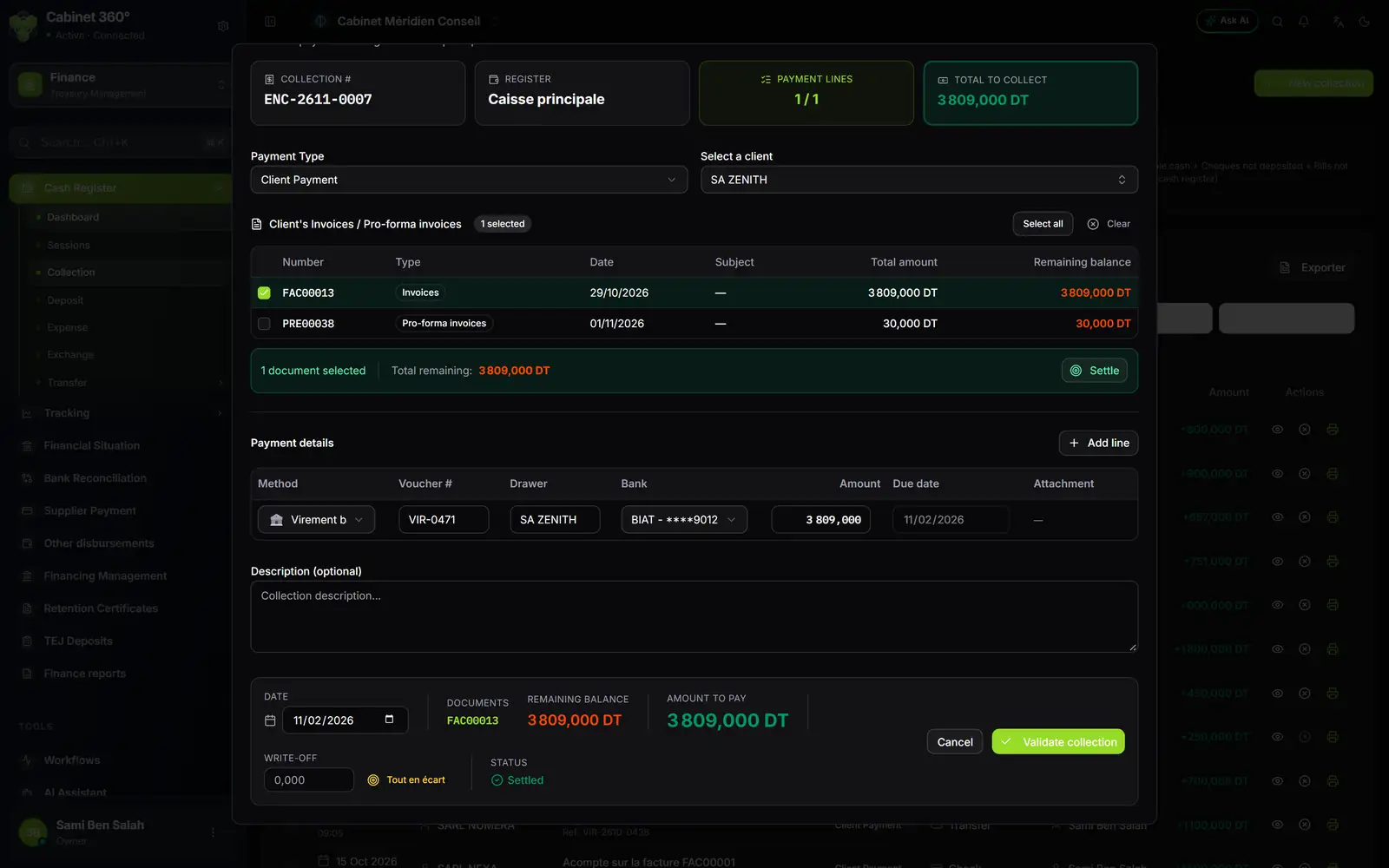
- 1. Collection #: the next number of the monthly series (ENC-YYMM-NNNN: year, month, rank).
- 2. Payment Type: it decides which documents are offered.
- 3. The client's documents: tick what this payment settles; the amount left to pay shows in orange.
- 4. Add line: one line per payment; two cheques make two lines.
- 5. The payment line: method, voucher number, drawer, bank or account, amount, due date.
- 6. The footer: date, remaining balance, amount to pay, write-off and status.
- Click New collection, at the top right.
- Choose the Payment Type, then the client.
- Tick the documents to settle. Settle fills the amount with the total due.
- Under Payment details, fill in the payment line. Add line is for a payment in several parts (20 lines at most): 500,000 DT in cash and the rest by cheque, for example.
- Check the Status at the bottom: Settled; Partial, followed by what will remain due; or Excess, followed by the overpayment.
- Click Validate collection. The message « Collection recorded successfully » appears, with Print receipt.
A collection with several lines is saved in one block: if one line is refused, nothing is saved.
The six payment types
| Type | What it is for |
|---|---|
| Client Payment | The usual case: settle one or more invoices or pre-invoices of the client, in the firm's currency. |
| Bounced Payment | Collect again a cheque or a bill of exchange that came back unpaid. The Client bounced payments list shows the rejected items (number, drawer, bank, due date, rejection reason); tick them, then the invoice they were settling. |
| Client Advance | Collect an advance on a quote. A quote in a foreign currency has the advance collected in its currency, with the Exchange rate. |
| Bank Withdrawal | Supply the cash register with cash withdrawn from one of the firm's accounts: choose the Source bank account. |
| Miscellaneous | Money coming in without a document: describe it in Description / Notes. |
| Foreign Payment | Settle an invoice in a foreign currency (EUR, USD…). Choose the Currency and check the Exchange rate; the list shows only documents in a currency other than the firm's. |
A quote is therefore settled with Client Advance, never with Client Payment.
The payment methods and what they ask for
| Method | Fields of the line |
|---|---|
| Cash | The amount is enough. |
| Cheque, Bill of exchange | Voucher # (number of the cheque or bill of exchange), Drawer, the client's Bank (its full name, or « Other bank »), Amount, Due date. |
| Transfer, Bank card, Flouci | The firm's account that receives the money, and the reference in Voucher #. |
Direct debit is not offered: it is an outgoing method only. Cheques and bills of exchange stay in the cash register until they are deposited (chapter 5); a transfer, a card or Flouci go directly to the bank and are followed in Tracking › Collections (chapter 7).
Overpaid, underpaid, credit notes and write-off
- The client pays more than the amount left to pay: the screen says so, and the excess is recorded as a client down payment. At this client's next collection, the screen recalls their active credit notes with Use Credit.
- The client pays less: the invoice moves to Partially paid and keeps its remaining amount.
- The write-off: a small amount you give up to settle the document (a few millimes of rounding, for example). Enter it in Write-off, or click Settle next to the field: it takes exactly what is missing. The document is then settled, but the cash register counts only the money really received.
- All as write-off gives up the whole amount still due, without collecting any money: keep it for cases decided by the firm.
The collection receipt
Print receipt opens the browser's print window on an A4 receipt, in shades of grey:
- at the top left, the firm's logo, or its name if there is no logo, with its contact details;
- in the centre, « Collection Receipt », its number and date, then the client and the payment type;
- the Settled Documents table, then the table of payments: the method and the amount, and for a cheque or a bill of exchange its number, the drawer, the bank and the due date;
- the total, « Amount in words: … » and two signature boxes: Company Stamp & Signature, Client Signature.
A receipt that is too long runs over several pages, like an accounting voucher: « Carried forward » at the bottom of the page, « Brought forward » at the top of the next one, and « Page i / N » in the footer.
To reprint, click the printer of a row in the list: the receipt window opens again, then Print receipt. For several receipts, tick the rows then Print receipts. Each receipt of a batch is numbered on its own.
Correct a collection
A collection cannot be edited: it is cancelled, then entered again.
- On the collection's row, click Cancel the collection. For a collection in several lines, first click its row to expand it, then cancel each payment line.
- Enter a Cancellation reason (optional) if needed.
- Click Confirm cancellation. A reversal is recorded: the cash register gives the amount back, and the invoice gets back its amount left to pay.
- Enter the right collection with New collection.
Find a cheque or a bill of exchange received
A click on the Unversed cheques or Unversed effets card (or on Cheques received and Bills received on the dashboard) opens the list of items, with the chips All, Deposited, Not deposited, Rejected.
The search field searches three columns: the document number, the drawer and the amount. Several words add up (« ben 1250 »); an amount is typed as it is shown, with or without separators (« 1 250,000 », « 1250 »). During a search, « n rows of N » shows next to the field; the footer gives the number of rows and their total.
The Available cash card, for its part, opens the folio's Cash movements: money in first, then money out as negative amounts, and the balance in the footer.