
The Finance reports page
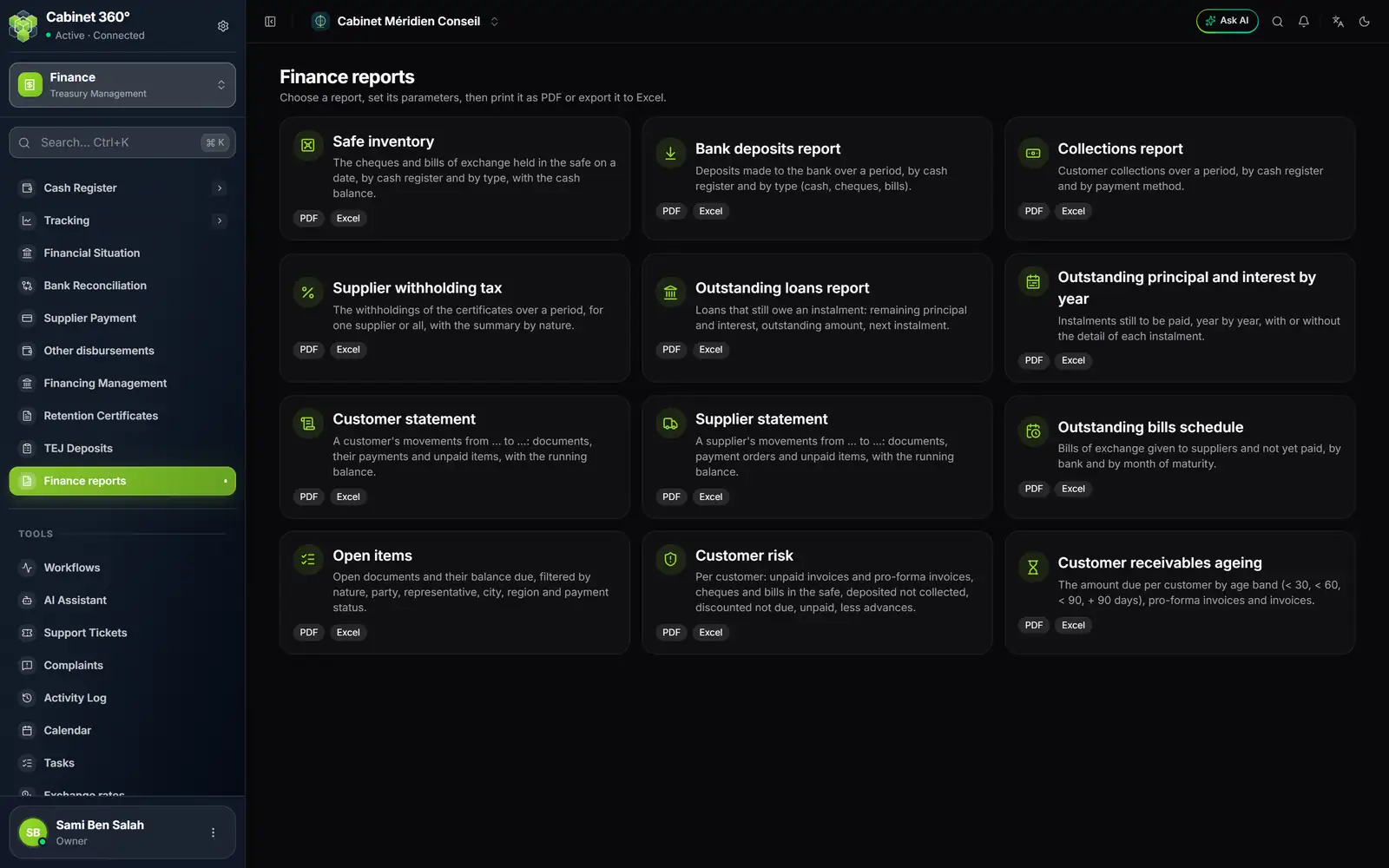
- 1. The cash register reports: safe inventory, bank deposits, collections.
- 2. Withholding and loans: supplier withholding tax, outstanding loans, outstanding amounts by year.
- 3. The statements: customer, supplier, and the outstanding bills schedule.
- 4. The outstanding items: open items, customer risk, receivables by age.
- 5. PDF, Excel: the formats offered; you choose in the report's window.
Each tile opens a parameters window (dates, cash register, type, third party…), then Print PDF or Export Excel. The "Print the selection criteria" box adds the chosen filters at the top of the PDF. A tile for which you do not have the rights is greyed out.
The cash register reports
| Report | What it shows | Parameters |
|---|---|---|
| Safe inventory | The cheques and bills of exchange that were in the safe on a date, item by item, and the balance of the cash and of the other methods tracked in the register on that date. Register by register, type by type, with subtotals. | Date, cash register, type |
| Bank deposits report | The deposits made to the bank over a period: document number, submission (for discount or for collection), bank, number of items, status (In progress, Deposited, Unpaid, Partly unpaid). | Period, cash register, type (cash, cheques, bills) |
| Collections report | The customers' collections over a period, with the documents settled and the state of each payment (In the safe, Deposited, Collected, Exchanged, Rejected for a cheque or a bill; In progress or Collected for a transfer; Received otherwise). | Period, cash register, type (one payment method) |
The safe inventory is a reconstruction: it says what the safe contained on that day, even if the cheques have been deposited since. The financial situation, on the other hand, reads today's state.
The three cash register reports only offer the cash registers that you can see (chapter 2).
Withholding and loans
| Report | What it shows |
|---|---|
| Supplier withholding tax | The withholdings of the certificates issued over a period (payment date), supplier by supplier (code, name, tax ID): gross, withholding, net; then a summary by nature and by rate, the one the tax return asks for. Draft, cancelled or rectified certificates are not included. |
| Outstanding loans report | One loan per line: instalments due, remaining principal and interest, outstanding amount including tax, next instalment (marked "due" or "unpaid"). Filter: the lending institution. |
| Outstanding principal and interest by year | The instalments still to be paid, year by year (year of the due date), with or without the detail of each instalment. |
These two loan reports follow the rule of the cards on the financing page (chapter 11): active or closed credits, instalments neither paid nor cancelled.
The customer and supplier reports
| Report | What it shows |
|---|---|
| Customer statement | A customer's movements over a period: their documents on the debit side, their payments on the credit side (for the part allocated to those documents), their unpaid items, and the running balance from a "Solde antérieur" (previous balance). |
| Supplier statement | The same for a supplier: their invoices and goods receipts, the payment orders issued, the unpaid items. |
| Outstanding bills schedule | The bills of exchange (or the cheques, or both) given to suppliers and not yet declared paid, by bank then by month of maturity. |
| Open items | The open documents and their balance due, filtered by type, third party, representative, city, region, method and payment status. It also exists for suppliers. |
| Customer risk | Per customer, on the day: unpaid invoices and pre-invoices, cheques and bills in the safe, VNR (deposited, not yet collected), ENE (bills handed in for discount, not yet due), unpaid items, minus advances. A customer whose total is nil is not printed. |
| Customer receivables ageing | The amount due per customer, by age band (less than 30, 60, 90 days, more than 90 days), pre-invoices and invoices, at a reference date. |
The CBT exchange rates
This screen is open to every member of the firm, with or without the Finance module, read-only. It shows the average rates of the currencies quoted in dinars that the Central Bank of Tunisia (CBT) publishes every working day, late in the afternoon. IntegraSys records them day by day: you find the rate of a past date without going to the CBT website.
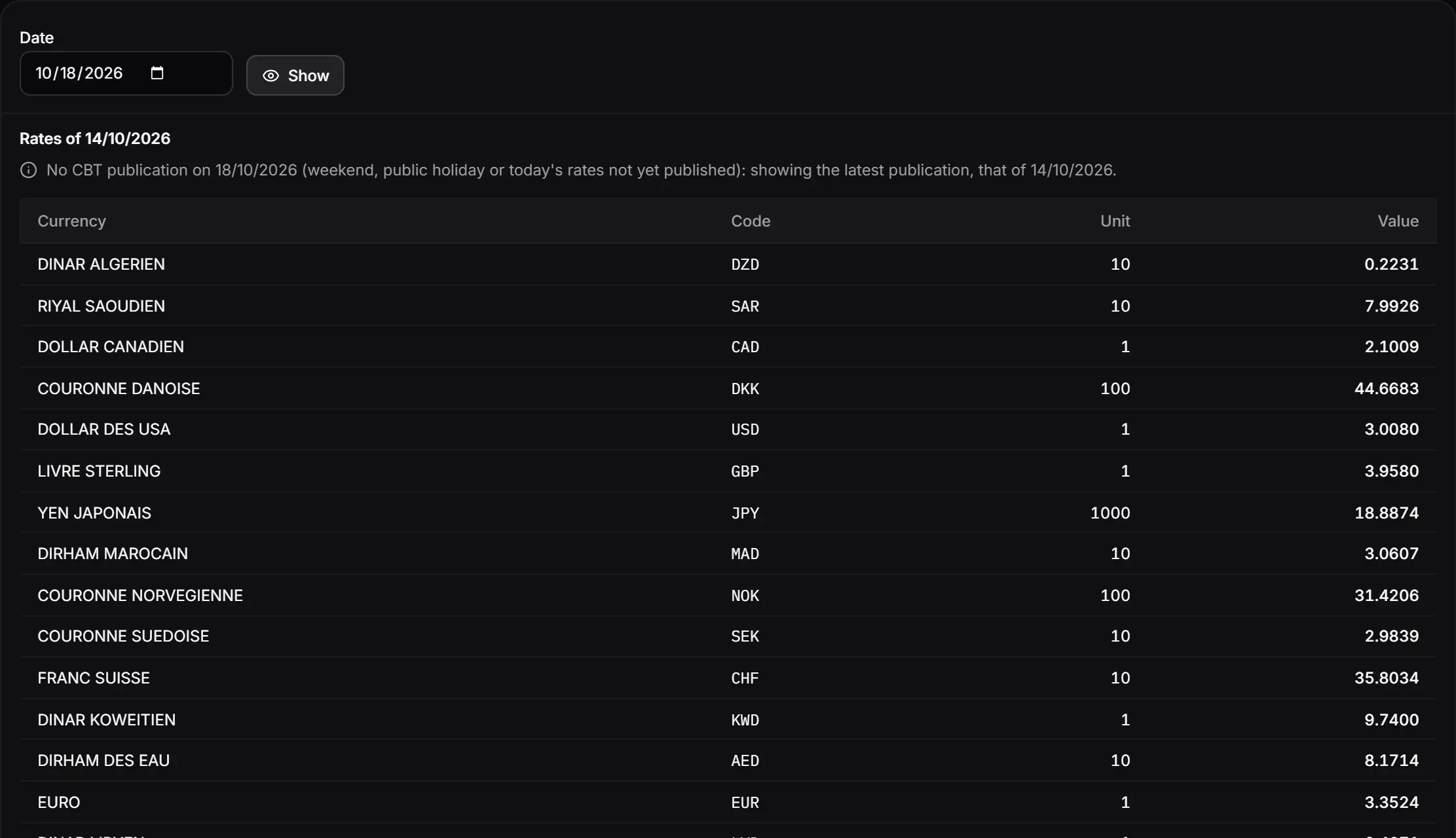
- 1. Date and Show: the date you want; Show reads it again.
- 2. Rates of …: the publication actually displayed.
- 3. The notice: no publication that day, here is the latest one before it.
- 4. Unit and Value: the value in dinars of the unit shown (1, 10, 100 or 1000).
- The Exchange rates table page opens on today's date.
- For another date, enter it in Date, then click Show. A future date greys out the button.
- Read the table: Currency, Code, Unit, Value. For the yen, the unit is 1000: 18.8874 dinars for 1000 yen, not for one.
- Print opens the table as a PDF ("Tableau des cours devises", the day, and the source: Banque Centrale de Tunisie).
- A day without a publication (weekend, public holiday, today's rates not yet published) shows the latest previous publication, at most ten days earlier, and says so.
- Screen left open since the morning? Click Show again: it fetches today's rates (the CBT is queried at most every fifteen minutes for the same date).
- A date not yet recorded is read from the CBT website on demand: the display can take up to about twenty seconds.
These rates are used elsewhere: the suggested rate of a Foreign payment (chapter 8) first takes the rates that the firm entered itself, then the CBT's; the accounting module's foreign purchases integration wizard, for its part, suggests the rate of the day of the transaction or the first publication after it.