The financing page
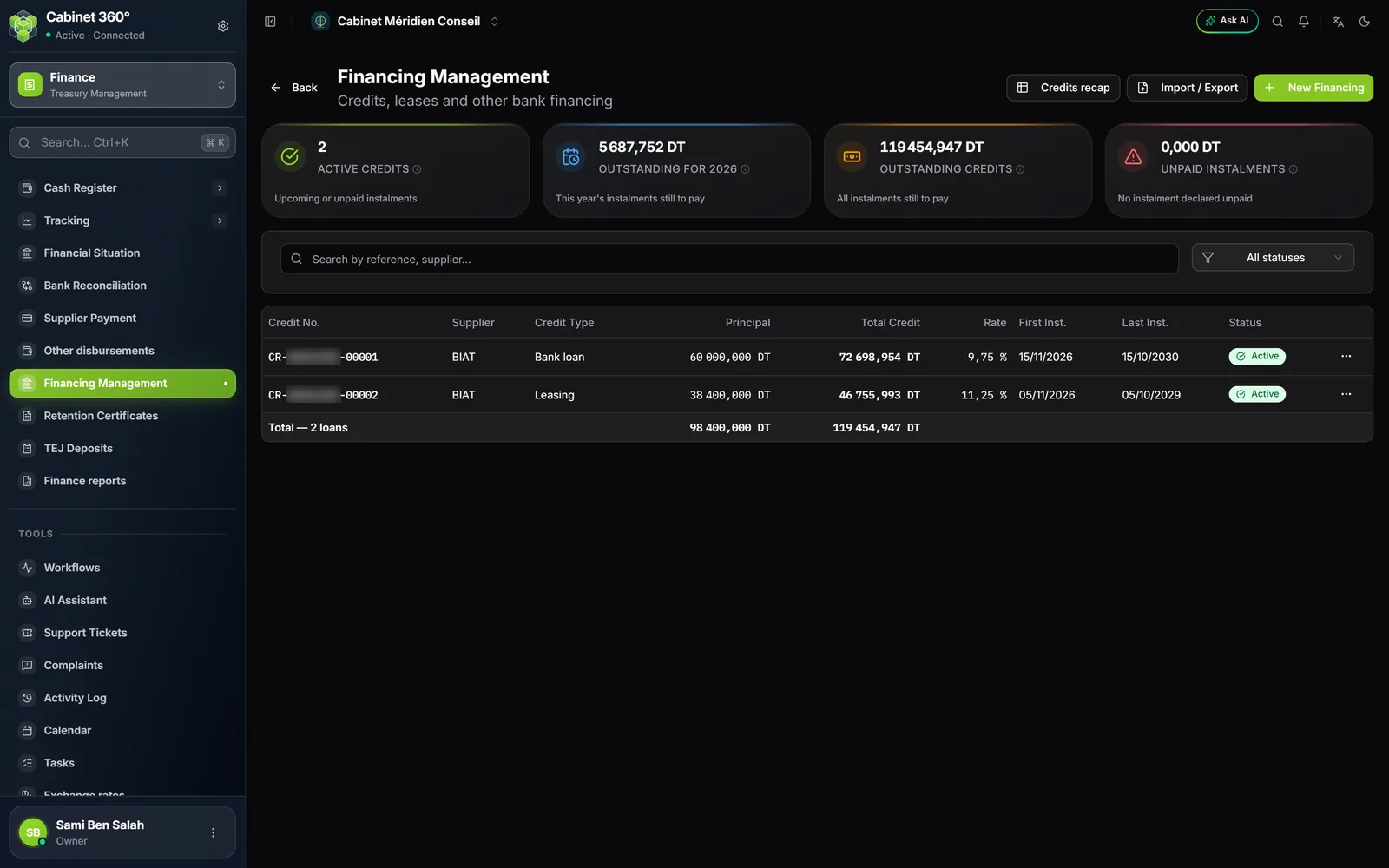
The Financing Management page ("Credits, leases and other bank financing") carries four cards, the list of financings with its total line ("Total — n loans"), and at the top the Credits recap, Import / Export and New Financing buttons.
The four cards
| Card | What it counts |
|---|---|
| Active credits | Active or closed credits that still have at least one instalment to pay: upcoming, due and not yet marked, or unpaid. |
| Outstanding for YYYY | The total including tax of the current calendar year's instalments that are neither paid nor cancelled. |
| Outstanding credits | The total including tax of all the instalments still to pay, all years combined. |
| Unpaid instalments | The total including tax of the instalments declared unpaid in the disbursement tracking. |
Each card opens the list of the credits it counts. A draft enters no figure (its instalments are a plan, not a debt), and neither does a cancelled credit. The amounts are the instalments including tax: what the bank takes.
The four natures
Each financing carries a Credit Type, and each type a Nature:
| Nature | Its schedule |
|---|---|
| Bank loan | The amortisation table issued by the bank: it is authoritative. It is entered line by line or imported. |
| Leasing | The table of lease payments provided by the lessor: it is authoritative, and it is entered or imported. |
| Tax / social payment plan | A payment plan granted by the tax administration or a social security body. |
| Other | Any other financing. |
For payment plans and the other natures, Generate Schedule computes the table from the amount, the number of instalments and the first date. This button does not exist for a bank loan or a lease: a recomputed table would drift from the bank's at the first rounding, and the bank's table is the one you read to check each debit.
Entering a financing
Click New Financing. The form changes with the nature of the chosen type.
A bank loan is entered as it appears on the bank's contract:
- Choose the Financing type and the Financial institution (the + creates a New financial institution), then the Contract No..
- Choose the Bank: the firm's account from which the instalments are taken. The RIB follows the account, read-only.
- Enter the Signature date and the Drawdown date (the release of the funds, which starts the interest count of the first instalment), the Financed amount, the Term (months), the Interest rate, the Frequency (Monthly, Quarterly, Semi-annual, Annual, Other) and the Number of Installments.
- Add the fees: Arrangement fee, Financing commission, Management commission, Insurance, Other fees.
- Enter or import the bank's amortisation table, then save: the loan is a Draft.
A lease, a payment plan or another financing is entered on the standard form:
- Choose the Supplier (the lender or the lessor) and the Credit Type (a New credit type can be created on the spot); the Title fills itself in. Add the Purpose.
- Choose the firm's Bank; the RIB follows the account.
- Enter the Credit Date, the Credit Rate (in %, two decimals, between 0 and 100) and the amounts: Principal, Fees, Interest, Insurance Premium, Disbursement Fee, VAT, Stamp duty, VAT / Disb. Fee.
- Fill in the schedule: line by line, Import (CSV or XLSX), or Generate Schedule for a tax or social payment plan and for the other natures.
- Save: the financing is a Draft.
In both cases, the bank and its RIB are mandatory: without them, no instalment would be attached to a bank in the tracking.
During entry, a lease's table reads in this order: No., Due date, Rent incl. tax, Rent excl. tax, Interest, Principal repaid, VAT, Stamp, Outstanding — interest and principal side by side, since their sum makes the rent excluding tax.
Activating the financing
A draft financing counts nowhere. For it to enter the outstanding amounts and the tracking, open its record and click Activate.
For the other natures, the check compares the header's amortisable total (principal, fees, interest, VAT, insurance) with the sum of the same items in the schedule.
An Active financing can then be Closed; a draft or an active financing can be Cancelled (with a reason). The instalments of a closed credit that have not been marked stay counted in the outstanding amounts, but can no longer be marked in the tracking: mark them all before closing.
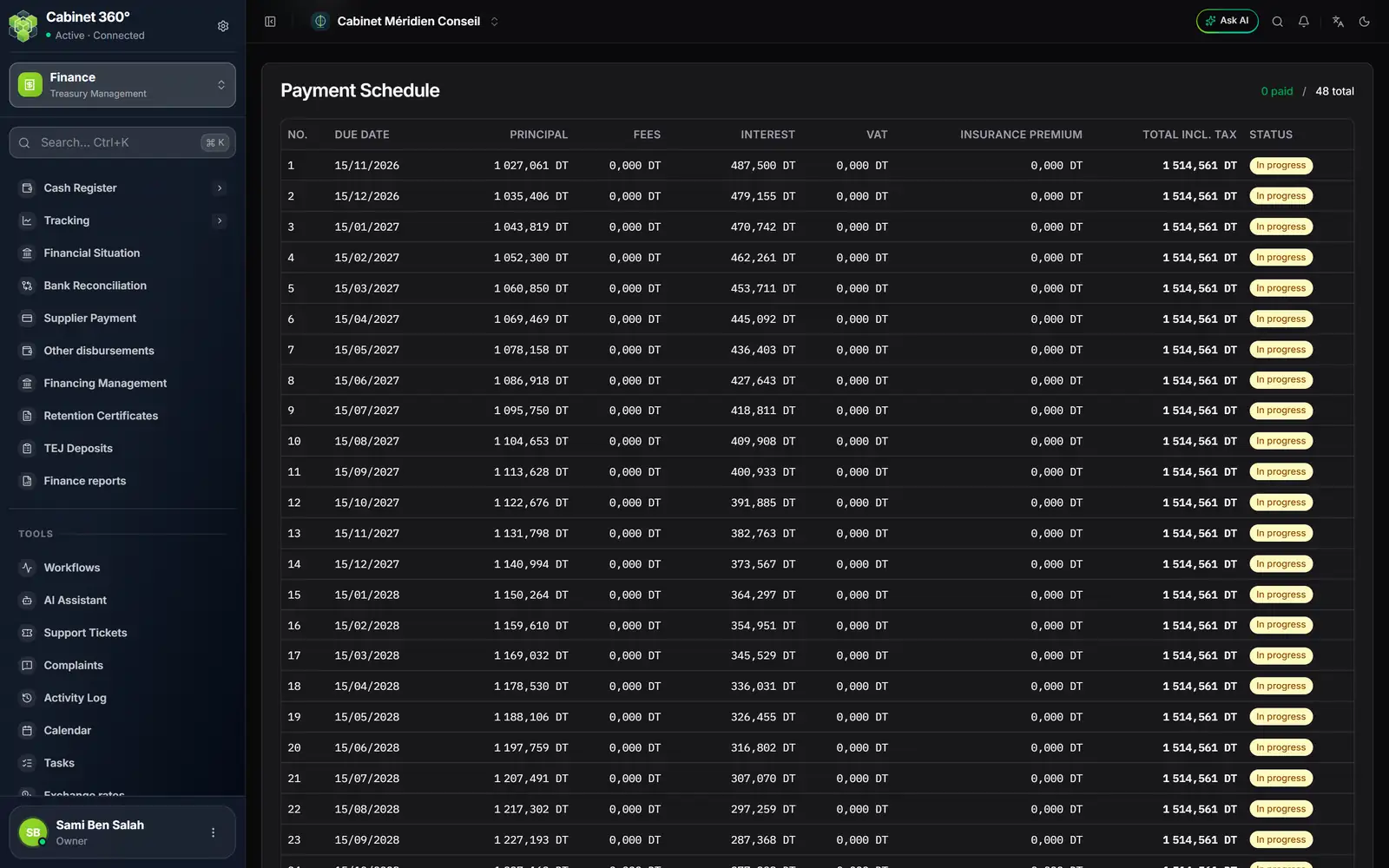
- 1. Paid out of the total: how many instalments have been declared paid.
- 2. Principal, Fees, Interest, VAT, Insurance Premium: the breakdown of each instalment.
- 3. Total Incl. Tax: what the bank takes at each instalment.
- 4. Status: In progress, Paid, Overdue, Unpaid, Cancelled.
Instalments, marked in the disbursement tracking
A credit's record shows the status of each instalment; it does not change it. An instalment is declared paid or unpaid where you can see the bank statement: Finance › Tracking › Disbursements, card Due credit instalments of the credit's bank (chapter 7).
- An instalment is due as soon as its date has arrived, that day included. Overdue shows the next day if nothing has been marked.
- Paid takes it out of the outstanding amounts and into the account's bank reconciliation.
- Unpaid makes it count in Unpaid instalments, in the financial situation's Unpaid financing, and offers it to the lending supplier in an Unpaid settlement order (chapter 8).
- Reset undoes the marking.
A credit statement
On each line of the list, Print (PDF) and Print (Excel) produce the credit's statement, on the general ledger template, in A4 portrait, with the firm's logo at the top of each sheet:
- Identification du financement (financing identification): reference, lender, type, purpose, contract number, branch, bank and RIB, the three dates, term, frequency, rate, financed amount, credit total and status.
- Échéancier (schedule): one line per instalment, closed by its total. A column that nothing fills (days, commission, stamp) is not printed.
- Récapitulatif par exercice (recap by year): one line per year, with the number of instalments, the Principal, the Intérêts (interest) and Principal + intérêts.
The credits recap
The Credits recap button opens the Credits recap by year of all active or closed credits: each credit summarised on its own, then the years combined. Every instalment counts, paid or not: it is an amortisation table, not an outstanding amount.
Below it, two readings for the year-end closing:
- Reclassification of the outstanding principal at year-end: for each 31/12, the Outstanding principal, its part Due within one year (the following year's instalments) and its part Due after one year. A credit only enters it from its drawdown date. The outstanding principal is not added up from one year-end to the next: it is a balance at a date.
- The detail of a year, chosen with the selector: its reclassification credit by credit, and its interest credit by credit, instalment by instalment, with the accrued interest not yet due at 31/12.
Print produces the whole thing as a PDF; the same content (recap, reclassification, detail of the year) also exists as an Excel workbook.