
The folio in a few words
A cash register session is called a folio. The English screens use both words: « Sessions » in the menu and on several buttons, « Folio » on the cards and in the closing window. Each folio carries a number specific to its cash register: folio no. 5 of the CAISSE-01 cash register is the same everywhere, on the dashboard card, in the closing window and on the cash journal (« CAISSE-01-5 »).
Three simple rules:
- a cash register has only one open folio at a time;
- collecting, depositing, spending, exchanging or transferring needs an open folio on the cash register;
- a closed folio does not reopen.
Open a folio
The Cash Register Sessions page shows Total sessions, Open sessions, Closed sessions and Active cash registers, then the list of folios, which you can filter by Cash register and by status (Open, Closed, Cancelled).
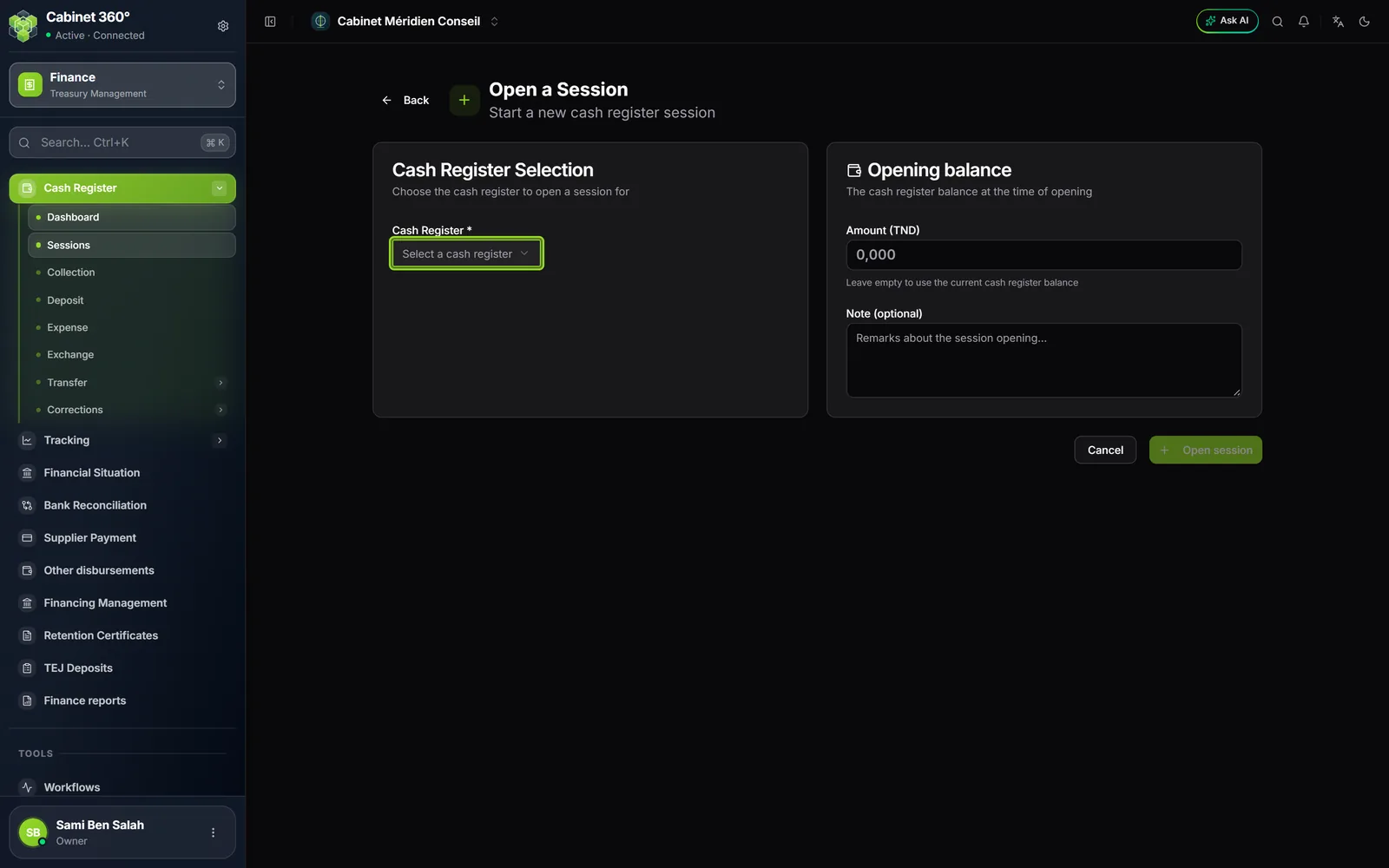
- Click Open a session. The Open a Session page opens.
- Choose the Cash Register. The panel recalls its Code, its Register balance and its Cash.
- Under Opening balance, enter in Amount (TND) the cash float you counted, or leave it empty to take the cash of the register. The screen tells you whether your amount matches or whether there is a difference.
- Add a Note (optional), then click Open session.
The dashboard's Open a session button opens a shorter window, « Open a cash register folio »: the opening balance there is the cash of the register, and it cannot be changed; add a note, read the Previous session summary if needed, then Open session. To open on an amount you counted, go through the Open a Session page.
The opening inventory of a new cash register
A cash register that starts often already holds money: cash, cheques or bills of exchange not yet handed to the bank. You declare them once, in the cash register's first folio.
- Open the cash register's first folio. On the dashboard, a purple banner recalls it. Click Enter inventory.
- The Inventory date is the folio's date. You can choose an earlier date (31/12/2026 for a start on 01/01/2027), never a later one. Say who Prepared by it.
- Enter the cash in the register as one overall amount.
- For each cheque, click Add a cheque: No., Drawer, Drawee bank, Amount; the Due date and the Client are optional. For each bill of exchange, Add a bill: the due date is mandatory there. Any other method « tracked in the register » has its own section, with one overall amount.
- The right-hand column gives the register balance method by method. Preview the statement prints the statement before validating.
- Click Validate the inventory.
As long as the first folio is open, the button becomes Edit the inventory. When that folio is closed, the inventory is frozen: in the following folios, Enter inventory stays greyed out and says why. The « Opening inventory » statement can still be printed: balance per method, list of cheques and bills of exchange, amount closed in words, signatures.
A cheque or a bill of exchange of the inventory that has already been deposited, exchanged or rejected can no longer be changed. The cash cannot go below what has already been spent.
Close the folio
At the end of the day, on the dashboard, click Close on the folio card. The Close folio window opens.
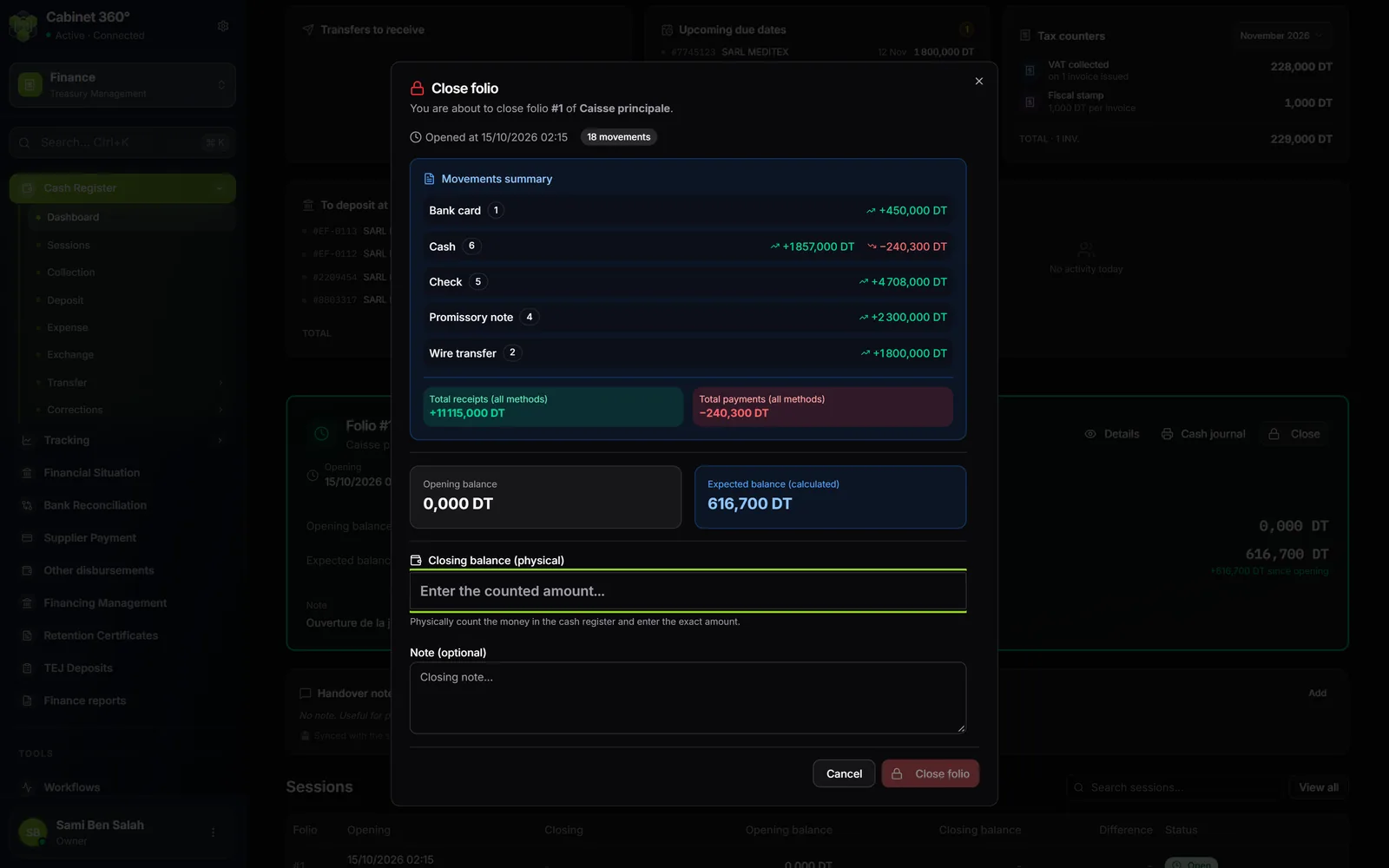
- Count the cash in the drawer, and only the cash: cheques and bills of exchange stay in the register until they are deposited.
- Enter the total in Closing balance (physical). The screen shows « Cash register is balanced », a Surplus or a Shortage.
- If there is a difference, choose What should happen to this difference?: Post it to the caisse (the register balance is adjusted by a correction) or Record only, for later regularisation (the balance does not move, the difference stays noted on the folio).
- Fill in the Note (optional) if needed. It becomes mandatory (the field gets an asterisk) to post a surplus to the register, and when the difference exceeds the cash register's justification threshold (no threshold by default).
- Click Close folio.
You can also close from the folio record, button Close session: it is the same window, with the same question in case of a difference. Closing needs the Manager or Operator role when users are assigned to the cash register.
The folio record
In Cash Register Sessions, click a folio. Its record shows the Opening and the Closing (date, operator, balance), the Difference, then the Summary by payment method:
| Column | What it counts |
|---|---|
| Receipts | What came in through this method during the folio. |
| Bank deposits | What went to the bank. |
| Payments | What paid a third party: supplier, disbursement, refund, expense. |
| Other outflows | Transfers, exchanges, corrections. |
| Balance | Money in minus all money out for this method. |
| Count | The number of movements of the method. |
An Inventory column is added when the folio carries the opening inventory. Cancelled movements, reversals and rejected items do not count in it. The Total row adds up each column. Below, Session movements lists each operation with its time, type, direction, method and amount.
The cash journal
The cash journal is the printed statement of a folio, the one you sign. The Cash journal button (or Print the cash journal) is on the open folio's card, on the cash register's page, in the list of folios and on a folio's record: the same document comes out of all four.
The cash journal is printed in French, whatever the screen's language; its headings are given below as printed, with their meaning. It is printed on A4 portrait, in the application's report template (logo at the top of each sheet):
- The identity: Caisse (cash register), N° Brouillard (the cash register's code and the folio number), Date début (start date), Date fin (end date; « En cours » if the folio is open), Clôturé (closed: OUI / NON).
- The opening balance (Solde initial), type by type: the opening cash, then, for each other method (cheque, bill of exchange, but also transfer, card, Flouci), the net of all the cash register's movements before the folio.
- The movements balance (Solde mouvements), type by type: receipts, payments, total.
- The movements detail (Détail des mouvements): N° Bulletin, Date, Opération, Type, N° Document (number of the cheque or bill of exchange, Document No. of a deposit), Encaissements (receipts), Décaissements (payments), Total. A movement in a foreign currency keeps its original amount next to its type. Both lines of a cancellation appear in it, as do the deposits and the difference correction.
- The closing balance (Solde final), type by type. For each type: opening balance + movements balance = closing balance.
- For a closed folio, the cash check (Contrôle des espèces à la clôture): expected balance, cash counted, signed difference (« +5,000 »), and the folio's note (the closing note, or the opening note if there is none).
- The closing statement (« Arrêté le présent brouillard à la somme de … », the journal closed at the sum of …) and the two signatures: Signature du caissier (cashier's signature) and Signature du contrôleur (controller's signature), always on the same sheet.
If your browser blocks the print window, the cash journal is downloaded as a PDF and a message says so: open the file and print it.