
The list of domains
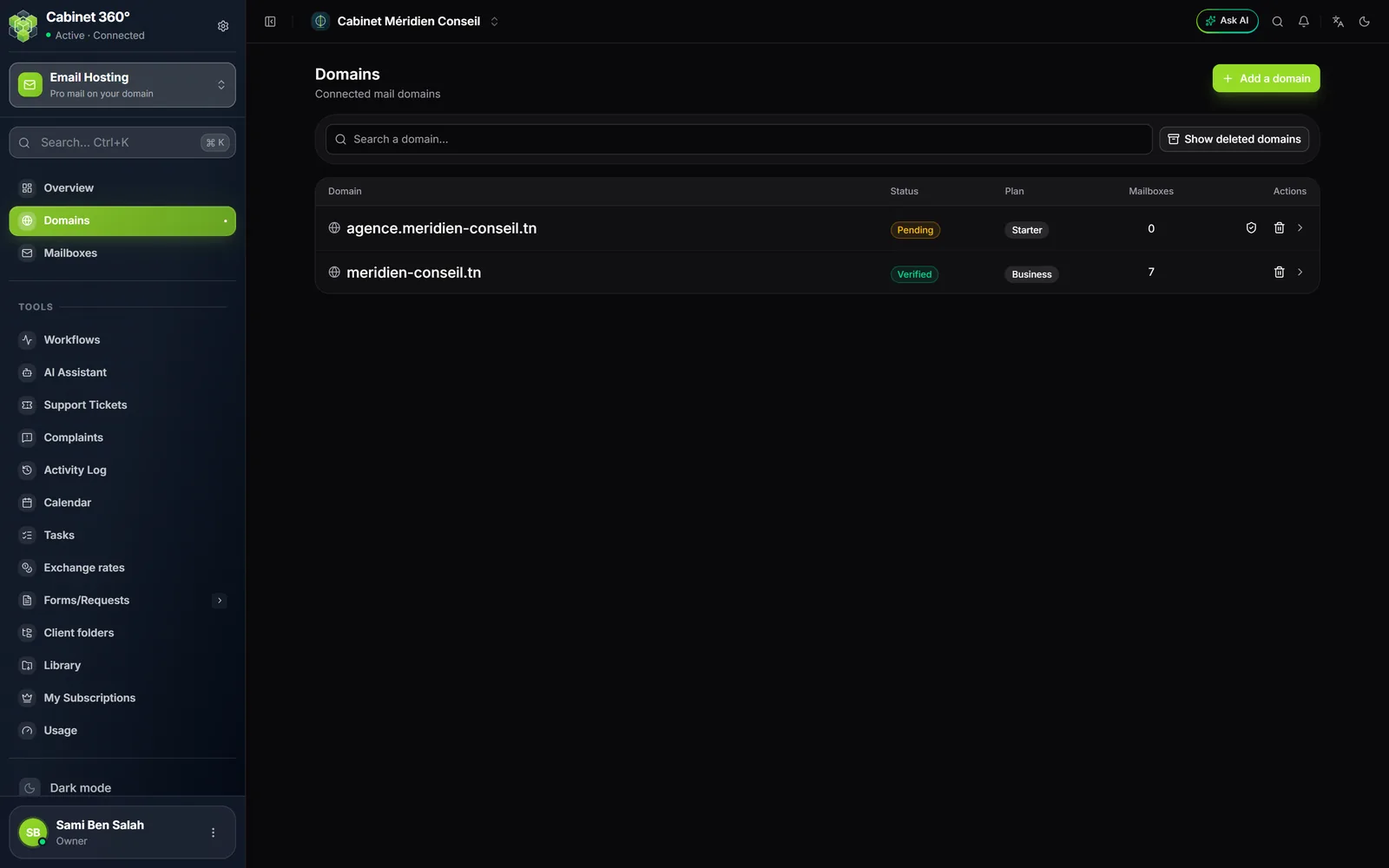
Each line gives the Domain, its Status, its Plan and the number of active Mailboxes. On the right, the Actions:
- the shield Verify, on a domain that is not Verified (Create right);
- the bin Delete (Delete right, see chapter 10);
- the arrow, or a click on the name, opens the domain's page.
The Search a domain… field filters the list as you type. The list shows 20 domains per page. The Show deleted domains button, visible with the Delete right, adds the domains awaiting permanent deletion.
The four statuses
| Status | What it means | How it changes |
|---|---|---|
| Pending | The three required records are not all found yet. | By itself: IntegraSys reads DNS every quarter of an hour and moves the domain to Verified as soon as they are right. |
| Verified | The domain is yours and ready: you can create mailboxes. | It stays so, even if a DNS read fails one day. |
| Failed | A required record exists with another value. | Fix it at the registrar, then Verify. |
| Suspended | The domain's mail is stopped: by Suspend, or because the domain is deleted. | Reactivate, or Restore if it was deleted. |
Until a domain is Verified, it gets no mailbox: the New mailbox button does not appear.
A domain's page
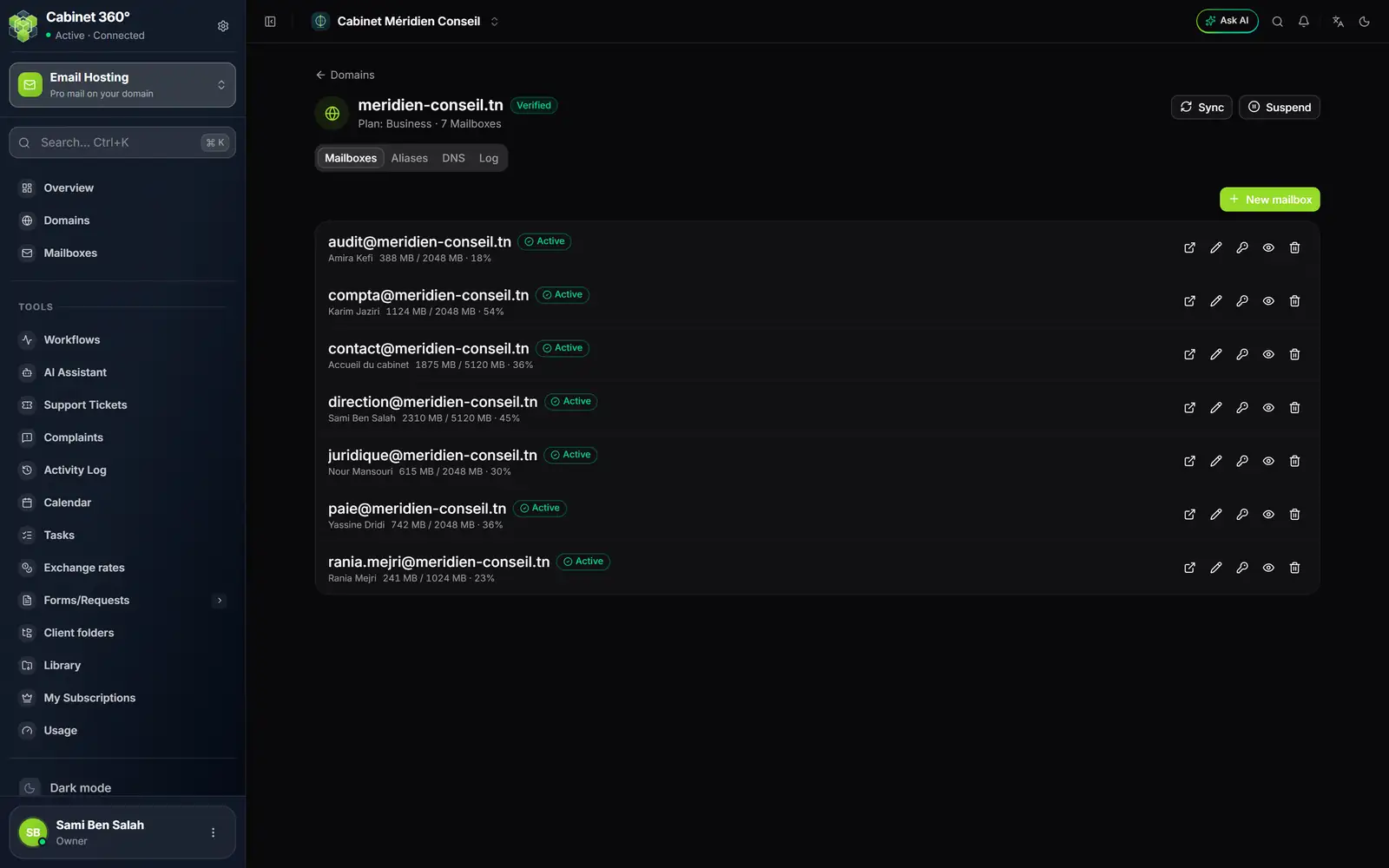
- 1. Domains: back to the list.
- 2. The domain's status next to its name; below, its plan and its number of active mailboxes.
- 3. Sync and Suspend (or Reactivate). On a domain not verified, Verify is added.
- 4. The tabs: Mailboxes, Aliases, DNS, Log.
The buttons at the top need the Create right; without it, they do not appear.
The orange banner
On a domain that is not Verified, an orange banner gives the reason that blocks it, as the last check found it, for example "Aucun MX trouvé pour meridien-conseil.tn." (no MX found). With no known reason, it says "Domain not verified — verify DNS before creating mailboxes."
Verify
Verify reads the records again at once. If the three required ones are right: "Domain verified — you can now create mailboxes". Otherwise: "Domain not verified yet", with the reason.
Sync
Sync sets the domain up again on the mail server and takes back its DKIM key from it. Use it when the DKIM signing card still has no value, or after an incident. The message says "Synced with the mail server", or "Sync failed", with no reason on screen today.
Once an hour, IntegraSys makes two catch-ups by itself: it creates on the server a domain already Verified that is not there yet, and it takes back the DKIM key of a domain already created. A Pending domain that was never created on the server waits for your click on Sync.
Suspend and Reactivate
- Click Suspend.
- The window "Suspend the domain?" recalls that the domain's mailboxes and aliases stop receiving and sending mail at once, until "Reactivate", and that nothing is deleted.
- Click Suspend to confirm. The badge changes to Suspended.
Reactivate asks nothing: the domain goes back to Pending, IntegraSys reads its DNS at once, and it becomes Verified again if its records are right.
The four tabs
| Tab | What it holds | Chapter |
|---|---|---|
| Mailboxes | The domain's mailboxes, their space and their actions. It opens first. | 5 and 6 |
| Aliases | The domain's forwards. | 8 |
| DNS | The IMAP / SMTP settings and the records, with their state read live. | 3 and 7 |
| Log | What happened on the domain, who did it and when. Visible with the Create right. | 9 |
The DNS tab
The DNS tab shows the same cards as the wizard, with their state. While the domain is not Verified and you have the Create right, it asks for the state every 15 seconds and verifies the domain as soon as the three required records are right. Re-check reads them again on demand. DNS itself is read at most once a minute: a fresh fix can take a minute to show.