
The limits, and where to read them
Your Email Hosting subscription sets three limits, read on the Overview (card Subscription usage, chapter 2) and in Tools › My Subscriptions:
| Limit | What is counted |
|---|---|
| Domains | Your domains that are not deleted, whatever their status. |
| Mailboxes | Your active mailboxes that are not deleted. A deactivated mailbox does not count. |
| Storage (GB) | The total of your active mailboxes' quotas: the space reserved, not the space the messages take. |
Aliases count in no limit. A deleted mailbox or domain stops counting as soon as it is deleted, during its 30 days set aside.
On top of that comes each domain's own limit, set by its plan: 10 mailboxes on Starter, 50 on Business, 250 on Pro, plus the mailboxes of running packs (chapter 3).
When a limit blocks
A limit reached refuses the addition. Today the screen says so without the reason: "Failed to add domain", "Failed to create mailbox", or "Update failed" for a raised quota. To know which limit blocks, look at the Overview's Subscription usage card, and at the "Plan default: …" line of the New mailbox window for the domain's limit.
Each action runs its own checks again:
| Action | What is checked |
|---|---|
| Adding or restoring a domain | The number of domains. |
| Creating, turning back on or restoring a mailbox | The domain (Verified, and its mailbox ceiling), the number of mailboxes and the storage. |
| Raising a quota | The storage. |
| Lowering a quota | Nothing: it is never refused. |
Making room
Before buying, see whether some space is sleeping:
- lower the quota of mailboxes that are not very full: their line gives the space used and the percentage;
- give a precise quota to new mailboxes instead of 0, especially on a Business or Pro domain;
- deactivate or delete the mailboxes of people who have left: they free their space at once.
Buying a mailbox or domain pack
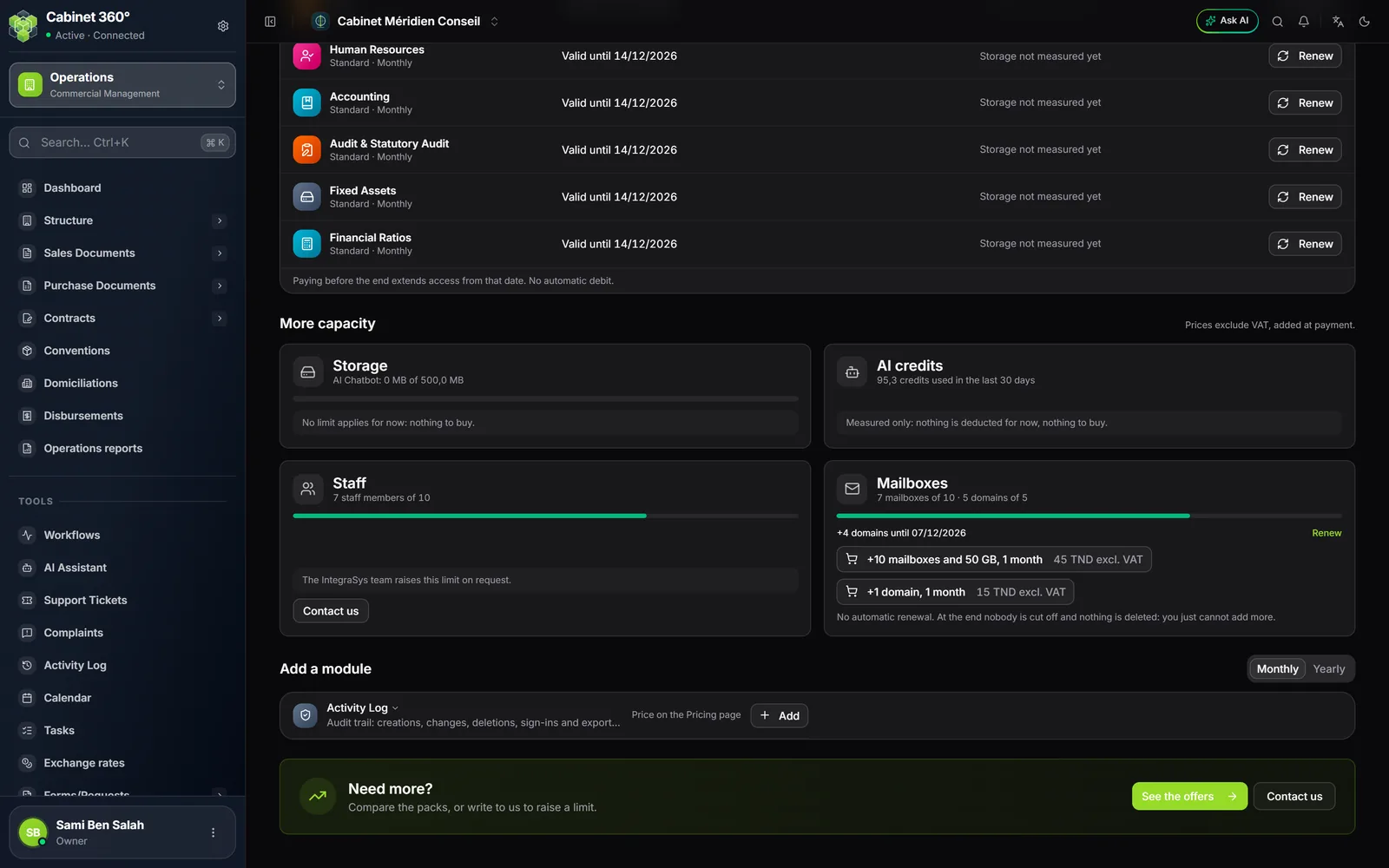
At the bottom of My Subscriptions, the More capacity section has a Mailboxes card while your Email Hosting subscription is running. It gives "n mailboxes of N" and "n domains of N", then one button per pack on offer, with its price excluding VAT, for example "+10 mailboxes and 50 GB, 1 year".
- Click the pack's button. The payment page opens.
- Pay. The pack applies as soon as the payment is confirmed: your limits go up at once.
- The card then shows the pack's line: "+10 mailboxes and 50 GB until dd/mm/yyyy".
The pack rules:
- Only the owner and administrators buy. Others read "Only an owner or an administrator of the company can buy a pack: ask one of them."
- A mailbox pack brings its own space. The button states the GB it adds to your storage, on top of the mailboxes. It also raises the mailbox ceiling of each of your domains.
- A pack lasts 1 month or 1 year, never without end, and does not renew by itself. Before its end, 7 days then 1 day before, IntegraSys recalls it in the bell, which the whole firm sees, and by email to the owner and administrators who switched on email notifications (they are off at the start).
- Renewing is not buying again. The Renew link on the pack's line makes the new one start when the current one ends: paying early loses no day. Buying the same pack again without that link adds it at once, on top.
- When a pack ends, nobody is cut off and nothing is deleted. Your limits come down. If you are above them, the card says so, for example "14 mailboxes for a limit of 10: none is cut off, but you cannot add more."
When no pack is on offer, the card says "The IntegraSys team raises these limits on request.", with a Contact us button.