
The rule
Deleting happens in two steps:
- At once, the mailbox or domain is suspended: no more mail, incoming or outgoing. It disappears from its lists and no longer counts in your limits. The messages stay on the server.
- After 30 days, IntegraSys erases it for good, with its messages, during the night.
In between, you can restore it. Deleting and restoring both need the Delete right.
Deleting a mailbox
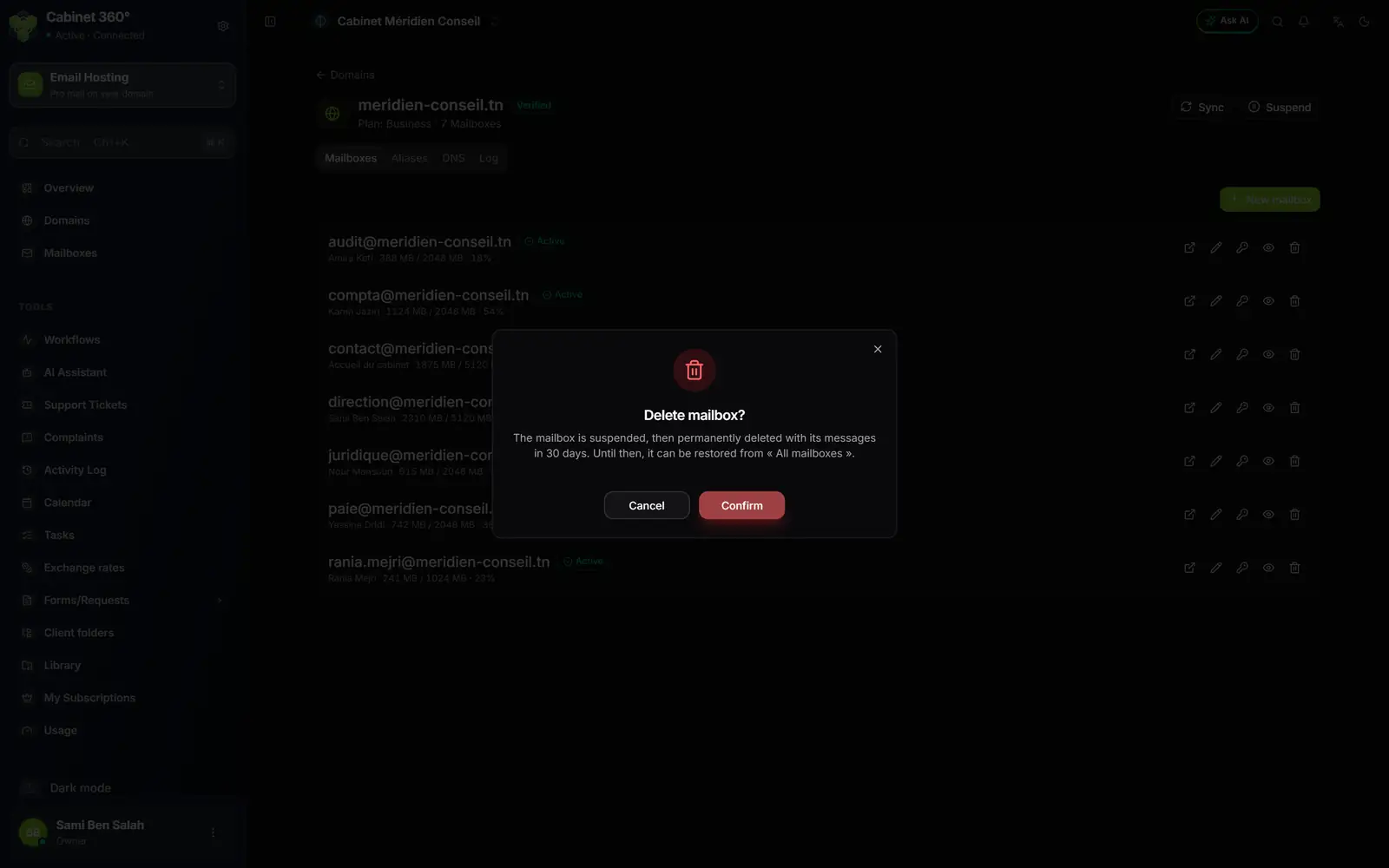
- 1. The reminder: the mailbox is suspended, then permanently deleted with its messages in 30 days, restorable until then from "All mailboxes".
- 2. Confirm starts the deletion; Cancel changes nothing.
- Open the domain, Mailboxes tab.
- On the mailbox's line, click the Delete bin.
- Read the window, then click Confirm.
- The message says "Mailbox deleted": "Permanent deletion in 30 days. Restorable until then."
The All mailboxes page
The All mailboxes page gives the mailboxes of all your domains, 20 per page, with their badge and their space. Search mailboxes… filters on the part before the @, the display name or the domain (not on the whole address). A click on a mailbox opens its domain's page.
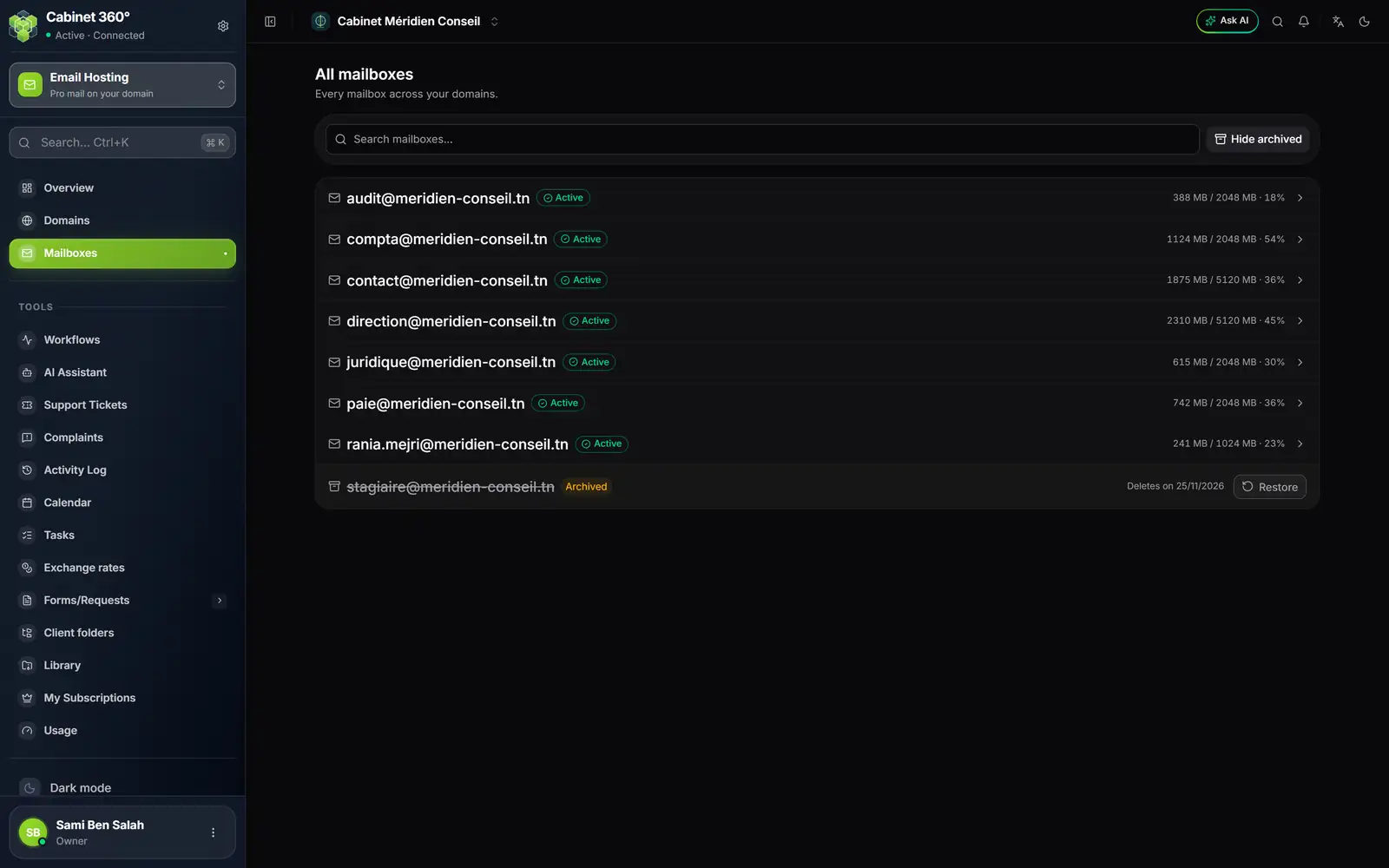
- 1. An active mailbox: a click opens its domain's page.
- 2. Show archived adds the deleted mailboxes; the button becomes Hide archived.
- 3. A deleted mailbox: struck through, with the Archived badge.
- 4. Deletes on …: the date of the permanent deletion. Restore brings it back into service.
Restoring a mailbox
- Open Mailboxes in the menu.
- Click Show archived.
- On the struck-through line, click Restore: "Mailbox restored".
The mailbox comes back Active, with its messages and its password. Since it takes a place again, IntegraSys first checks the limits:
- the domain's: "Le domaine a atteint son nombre maximum de boîtes. Libérez une place ou augmentez la limite avant de restaurer." (the domain has reached its maximum number of mailboxes);
- your subscription's, in number of mailboxes and in storage (chapter 11);
- the domain must be Verified: on a pending, suspended or deleted domain, the restore is refused ("Restore failed").
Deleting a domain
A domain is deleted empty: as long as it keeps a mailbox, even a deactivated one, deletion is refused ("Delete failed"). Delete its mailboxes first.
- Delete all the domain's mailboxes, as above.
- Open Domains. On the domain's line, click the Delete bin.
- The window "Delete domain?" says: "The domain is suspended, then permanently deleted in 30 days. Until then, « Show deleted domains » lists it and « Restore » brings it back." Click Confirm.
- The message says "Domain deleted", with the same 30-day reminder.
Restoring a domain
- Open Domains, then click Show deleted domains.
- The domain's line is struck through, with the Deleted badge and "Permanently deleted on dd/mm/yyyy".
- Click Restore: "Domain restored".
The domain goes back to Pending, IntegraSys reads its DNS at once, and it becomes Verified again if its records are still in place. Restoring a domain counts against your subscription's domain limit.
Deactivate, suspend or delete: which to choose
| Action | Where | What stops | What is erased | To come back |
|---|---|---|---|---|
| Deactivate a mailbox | Edit, turn Active off | This mailbox | Nothing | Turn Active back on |
| Suspend a domain | Domain's page, Suspend | All the domain's mailboxes and aliases | Nothing | Reactivate |
| Delete a mailbox | The mailbox's bin | This mailbox | Everything, after 30 days | Restore, within 30 days |
| Delete a domain | The domain's bin, once empty | The domain | Everything, after 30 days | Restore, within 30 days |
| Delete an alias | The alias's bin | This alias | Everything, at once | Create it again |