
Tasks
Tasks is a module of its own. My day shows your open tasks: late, today, the next seven days. IntegraSys adds its own: tax deadlines, portal deposits, items to approve. A client's task can only be given to someone who sees that client.
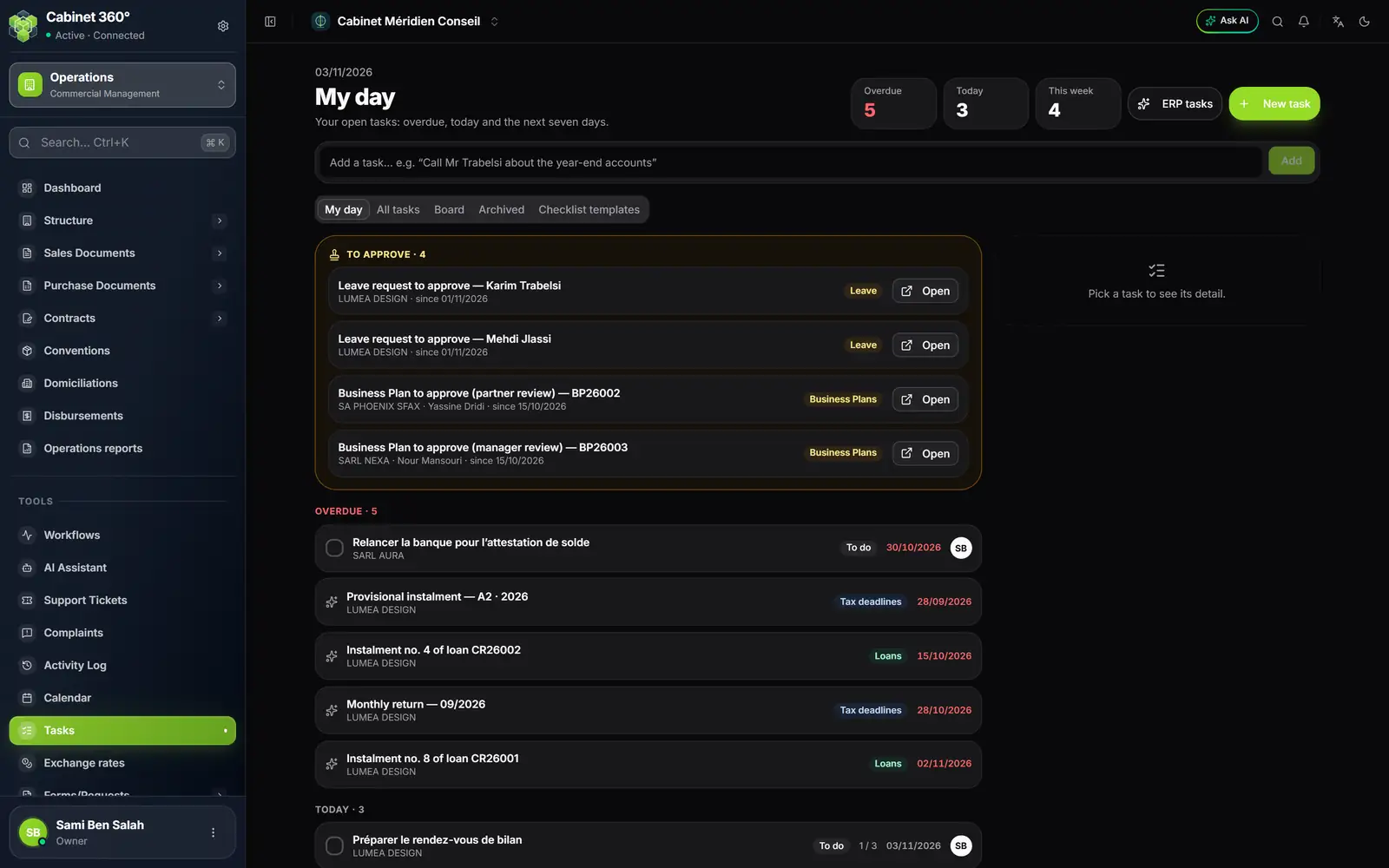
- 1. Tools: the section below the module's menu.
- 2. Tasks, which opens on My day.
- 3. The day's counters.
- 4. A task brought by IntegraSys, marked with a sparkle.
The calendar
Tools › Calendar gathers appointments and deadlines. Its reminders arrive in the bell, never by e-mail. A ticket with a deadline creates its event there.
The AI assistant and OCR
Tools › AI Assistant opens the firm's assistant; it requires the AI module subscription. Documents are read by OCR in two places: Extractor (OCR), from the purchase invoices in Operations, and OCR (Pre-accounting) in a client's accounting file (chapter 8).
The client portal
Each client can be given access to the portal. There they see their invoices, their conventions and domiciliations, their documents and their tickets and, depending on their services, their accounting documents or their payroll. They deposit their documents there; the firm decides what becomes of them. Access is created in Settings › Exchanges & data › Client Portal.