
A question to the activity log
The Activity Log (a separate module) records every action of the users. Rather than juggling five filters, ask it a question.
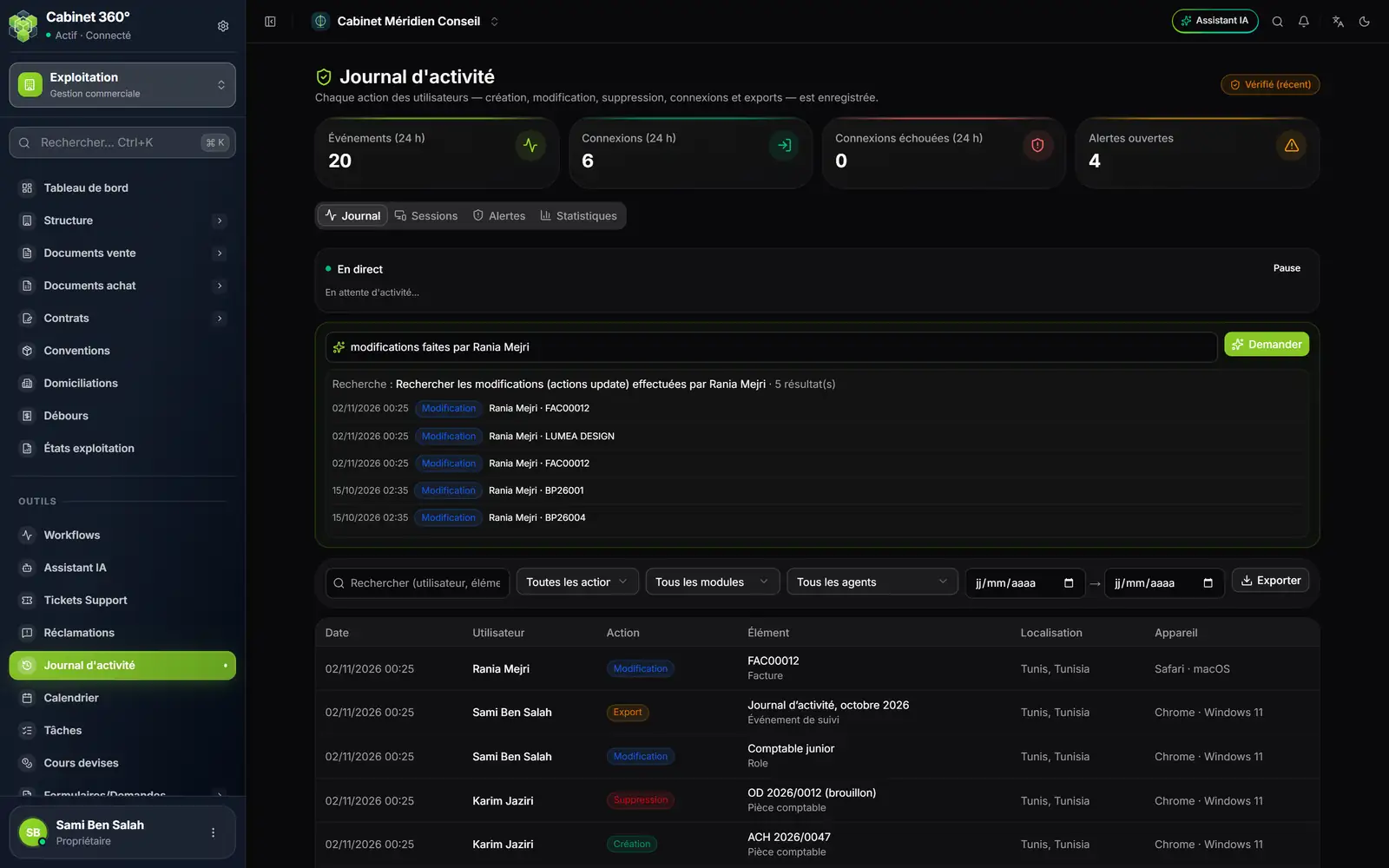
- 1. The question, in plain words: « modifications faites par Rania Mejri » (changes made by Rania Mejri).
- 2. Ask runs the search.
- 3. What the AI understood: « Searched: … » and the number of results.
- 4. The rows found, taken from the log itself.
Type your question in Ask a question — e.g. "invoice deletions this week" then click Ask. The AI turns the question into filters (who, what, when); it is the log that answers, with its own rows. The AI receives only your question, never the log's rows.
When the AI cannot turn the question into a search, the screen says so: « L'IA n'a pas su traduire cette question en recherche. Reformulez-la. » (The AI could not turn this question into a search. Rephrase it.) Always reread the « Searched: … » line: a vague question can come back with no filter and simply list the latest rows.
The readings of the other modules
These screens read a document through AI, then have you review it before saving. Each one is described in its module's book.
| Screen | Button | What the AI reads | Book |
|---|---|---|---|
| An accounting file's workspace, OCR (Pre-accounting) inbox | Analyse | Purchase and sales invoices, bank statements; an entry is proposed. | Accounting & Financial Statements |
| An accounting file's Bank reconciliation | Statement OCR | A bank statement as a PDF or scanned. | Accounting & Financial Statements |
| A tax client's monthly return | « Import a return (PDF) » frame: Read the PDF, then Review and apply… | A monthly return already filed, line by line. | Tax & Returns |
| An HR client's Employees | Scan (OCR); in the record, « Pre-fill from documents » frame, Import documents button | ID card, passport, contract, CNSS card, RIB: the fields read pre-fill the employee. | HR & Payroll |
The texts and the mappings proposed
| Screen | Button | What the AI does | Book |
|---|---|---|---|
| Business Plan: market study, business model | Draft with AI | Drafts the text fields still empty (nothing is saved before your Save; it never replaces a text you typed) and adds rows to the empty tables of the market study: those rows are saved at once. | Business Plan |
| External Connection › Mappings, window of the « Salariés » set (Employees) | « Propose the mapping with AI » frame: List columns and propose | Reads the names of the columns of the Sage Paie employees table (never their data) and proposes the column for each field of the employee record. | Sage Connection |
| AI Business Plan › AI Generator | The conversation | A complete business plan, written and costed from your answers. | Business Plan |
Each of these aids uses AI credits, under its own name in Tools › Usage (chapter 2).