
It reads your data, with your rights
To answer, the assistant queries the data of your company, and nothing else. At each reading, it checks that you are an active member of the firm and that your role has the right to view what it is about to read.
| Area | What it can find |
|---|---|
| Sales | Unpaid, overdue and recent invoices; revenue of the month and month-by-month comparison; payments received; pending quotes. |
| Clients and suppliers | Top clients, a client's balance, searching for a client or a supplier. |
| Purchases and stock | Expenses, articles, stock alerts, stock movements. |
| Cash registers and bank | Balance of the cash registers you can see, cash register sessions and movements, bank accounts. |
| Conventions and domiciliations | The contracts in progress, the disbursements. |
| Team and time | Agents, timesheets and attendance (an agent without administration rights reads only their own). |
| HR | Files, financial years and payroll periods. |
| Legal | Minutes, articles of association, share transfers. |
| Calendar | The firm's events. |
When your role does not have the right, the assistant says so instead of answering: « Vous n'avez pas la permission de consulter « … » via l'assistant. Demandez l'accès à un administrateur de votre entreprise. » (You do not have permission to view « … » through the assistant. Ask an administrator of your company for access.) It never sees another firm's data.
It analyses
Beyond simply reading, the assistant can:
- forecast cash at 30, 60 or 90 days;
- spot anomalies: duplicates, missing payments, unusual amounts, delays;
- check a document before sending: mandatory mentions, VAT calculation, fiscal stamp;
- draw a chart with bars, lines or a pie;
- prepare a report: a client statement, revenue, unpaid invoices, a tax summary;
- do a Tunisian calculation: corporate income tax, provisional instalment, withholding tax, TFP, VAT, payroll and CNSS, and answer on e-invoicing, banking, investment incentives or public procurement.
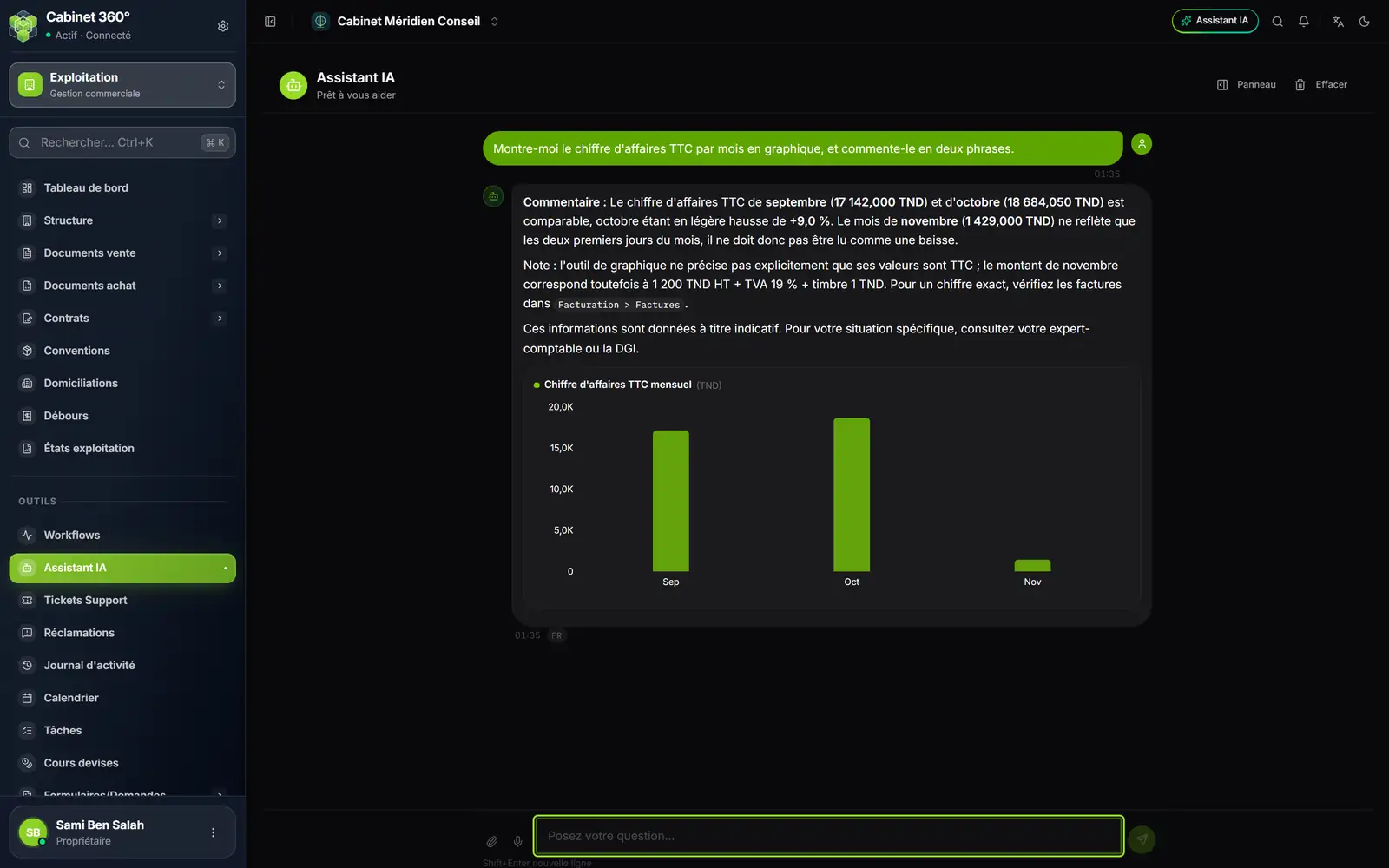
- 1. The request: a chart and two sentences of comment.
- 2. The comment: the assistant compares the months and explains November, only two days old.
- 3. Its caveat: it says what it could not check and where to do it.
- 4. The bar chart, in dinars.
Note the assistant's caveat: when a piece of data is missing, it says so and sends you back to the screen. Take its figures for what they are: a quick reading of your data, to be checked on screen before you quote them to a client.
It relies on a Tunisian knowledge base
For your tax and social questions, the assistant draws on a Tunisian knowledge base: VAT, corporate and personal income tax, withholding tax, CNSS, labour law, legal forms, penalties, tax audit procedures, tax amnesty.
It drafts, it does not send
Ask it for a text: a reminder, an e-mail, a summary. It drafts it from your data, and stops there.
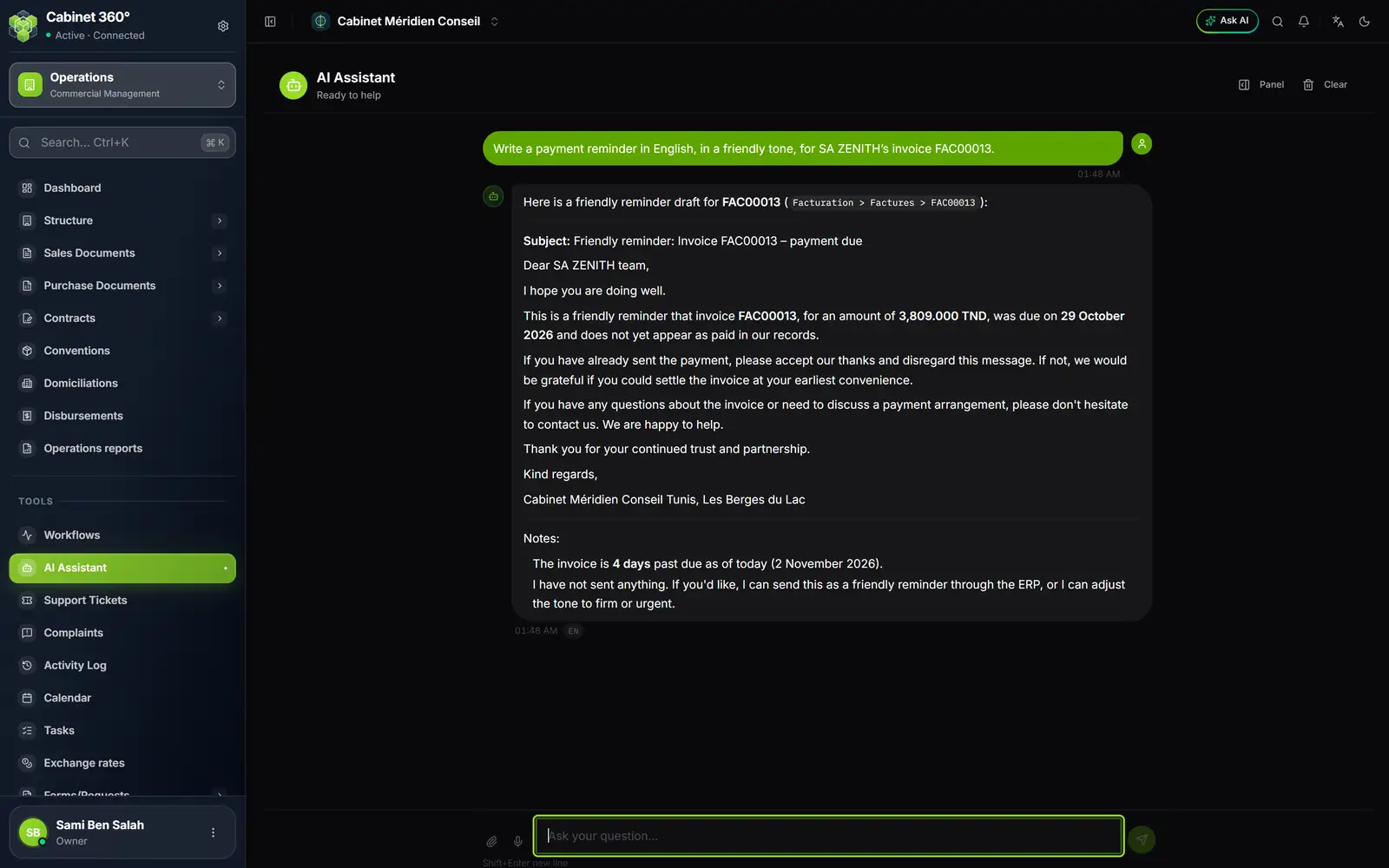
- 1. The request: a friendly reminder for invoice FAC00013.
- 2. What it did: a draft, not a sending; it says « draft » in its first line.
- 3. The subject of the e-mail it proposes.
- 4. The text of the reminder, to copy or to have sent.
- 5. Its notes: the days overdue, nothing sent yet, and the next step offered: sending it through the ERP.
To have it send a reminder by e-mail, say so. Sending then goes through a confirmation card (chapter 5): nothing leaves without your click. What leaves is the software's standard letter for reminders (subject « Rappel de paiement — Facture … » (payment reminder — invoice …), in the tone chosen), not the drafted text: the card shows you what will leave. To send the drafted text, copy it into your mailbox.