
Exporting as a PDF
In the panel, the Export as PDF icon (next to the credit counter) downloads the conversation. It appears as soon as there are messages, and when no answer is being written.
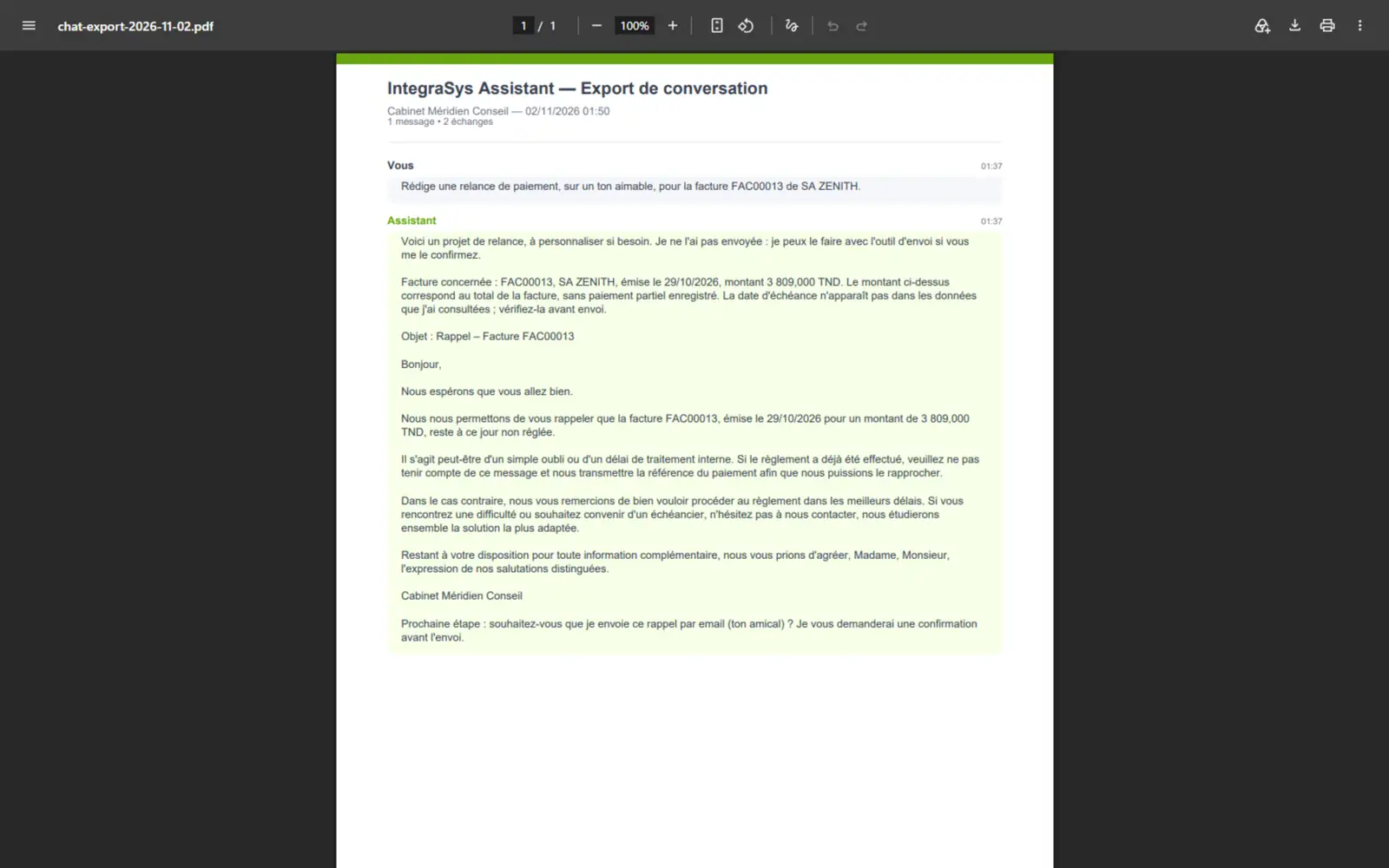
- 1. The title « IntegraSys Assistant — Conversation Export ».
- 2. The firm, the date and the time, then the number of messages and exchanges.
- 3. You: your question, with its time.
- 4. Assistant: its answer, in full.
The file is named chat-export- followed by the date (chat-export-2026-11-02.pdf). Keep it in the client's
folder when the answer was used for a decision.
Copying, rating, starting again
Under each answer:
- Copy message copies the answer with its formatting marks (asterisks, tables in
|): touch it up after pasting it; - Helpful and Not helpful rate the answer; your ratings help the IntegraSys team improve the assistant;
- Retry runs a failed question again, without its attached file: for a question with a file, attach it again.
To start again from scratch, click Clear conversation in the panel (or Clear on the page), then click a second time within the next few seconds: « Click again to confirm » in the panel, « Confirm? » on the page.
Where the conversation is kept
The screen keeps the conversation in your browser, on this computer: its last 100 messages. It disappears from there when you sign out, when you switch company, or when you clear it. There is no list of past conversations: to keep an answer, export it. The server, for its part, keeps your questions for the firm's statistics.
When the assistant cannot answer
| Message | What to do |
|---|---|
| « Too many messages. Please wait a few minutes. » | You went over 50 messages per minute or 500 per hour. Wait a little. |
| « No credits remaining. Contact your administrator to recharge. » | The firm has no AI credits left (chapter 2). The question box closes. |
| « Unable to connect to the server. Check your internet connection. » | Your connection is down. |
| « The service is very busy right now. Please wait a few seconds and try again. » | The AI service is under load: try again. |
| « This answer was cut off before it finished. The text shown is incomplete — ask again. » | The answer was cut off on the way: Retry. |
| « The attached file could not be read: the question was not sent… » | Attach the file again, or ask the question without it. |
| « Your firm's AI policy does not allow sending documents to the assistant. » | The firm has cut off sending documents (chapter 2). |
| « The assistant could not answer: … » | The message gives the cause, sometimes with a code in brackets: pass it on to support if it comes back. |