
The convention PDF
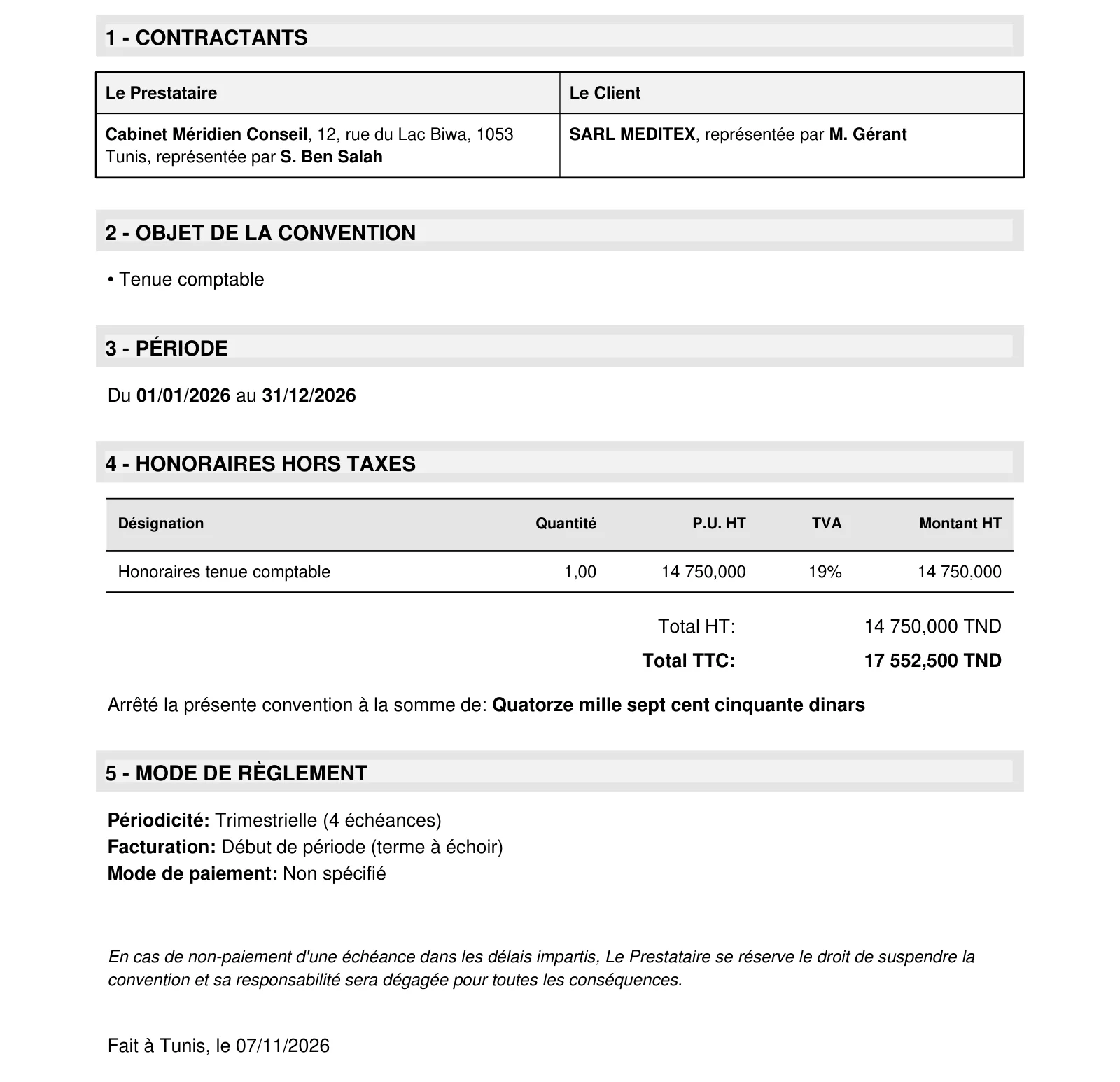
Download PDF produces the convention to sign, in black and white, with no template to set up. It is printed in French only:
- a title: the convention's first object, in capitals, and its number;
- 1 - CONTRACTANTS (the parties): the provider (your company) and the client;
- 2 - OBJET DE LA CONVENTION (purpose of the convention): the list of objects;
- 3 - PÉRIODE (period): “Du … au …” (from … to …);
- 4 - HONORAIRES HORS TAXES (fees excl. tax): the table of articles (designation, quantity, unit price excl. tax, VAT, amount excl. tax), the total excl. tax, the total incl. tax and the sum in words (“Arrêté la présente convention à la somme de…”);
- 5 - MODE DE RÈGLEMENT (payment terms): the periodicity, the billing moment (except “Other”), the payment method and, under “Other”, the table of due dates;
- 6 - CONDITIONS PARTICULIÈRES (special conditions), if there are any;
- a clause on the non-payment of a due date, “Fait à [town of the company], le [today's date]”, and the two signature blocks: the name of each party and that of its signatory.
The footer of each page repeats your company: address, phone, e-mail, tax ID and CNSS number.
Printing on your template
Print puts the convention into your print template of type “Convention”; from the record, a preview opens before the browser's print window. Without a template, a message says so (“Template not configured” on the record, “Print not configured” from the list): create the template in Settings (chapter 2). The PDF, for its part, always works.
Printing a domiciliation
The domiciliation prints on your print template of type “Domiciliation”: there is no built-in PDF as there is for the convention. Without a template, printing says so (“No print template available for domiciliations…”): create it in Settings (chapter 2).
The statement by client
The By client button opens the “Statement by client”: a table of each client's conventions over three years, the two past years and the current year (marked “ongoing”).
- Each year column adds up the amount excl. tax of the conventions that touch that year. A convention that straddles two years counts in both.
- Growth: the gap between the two past years, in amount and in percentage.
- The year's Target: last year's amount, raised by the annual increase of the client's most recent convention.
- The Total row adds up all the clients. The clients are ranked from largest to smallest on last year.
The compared conventions report
The Agreements comparison tile prints, for the chosen year (N) against the year before (N-1), what each convention pre-invoiced. One row per convention active in either year, or pre-invoiced in one of them. The printed report is in French; its columns:
| Column | What it says |
|---|---|
| Référence, Client, Périodicité, Statut | The convention (reference, client, periodicity, status) |
| Facturée N | Oui (yes) if at least one pre-invoice of the year became an invoice, Non (no) otherwise |
| Préfacturé HT N, N-1 | The amount excl. tax of the pre-invoices dated in each year, drafts included, cancelled ones excluded |
| Écart, Évolution % | The difference between the two years (gap, change in %) |
| % préfacturé N | The convention's share of the year's pre-invoiced total |
The compared domiciliations report
In Operations › Operations reports, the Domiciliations comparison tile prints the pre-invoiced amount excl. tax of each domiciliation, the chosen year against the year before, with the same columns as the conventions report: an active domiciliation that billed nothing appears in it with “Non”.
Exporting and importing
Export / Import opens “Import / Export conventions”.
- Export: Export Excel (.xlsx) or Export CSV (semicolon). The file holds every convention that is not archived, with all the columns.
- Import: first download an empty template, Simple template or Full template, fill it in, then drop it in (CSV or Excel). The report gives the conventions created, the rows skipped and the errors, row by row.