
The Conventions page
At the top right: the refresh button, Export / Import, By client and New convention. If the “Pre-invoice” stub is not set up, a reminder shows below: without it, no pre-invoice can be generated.
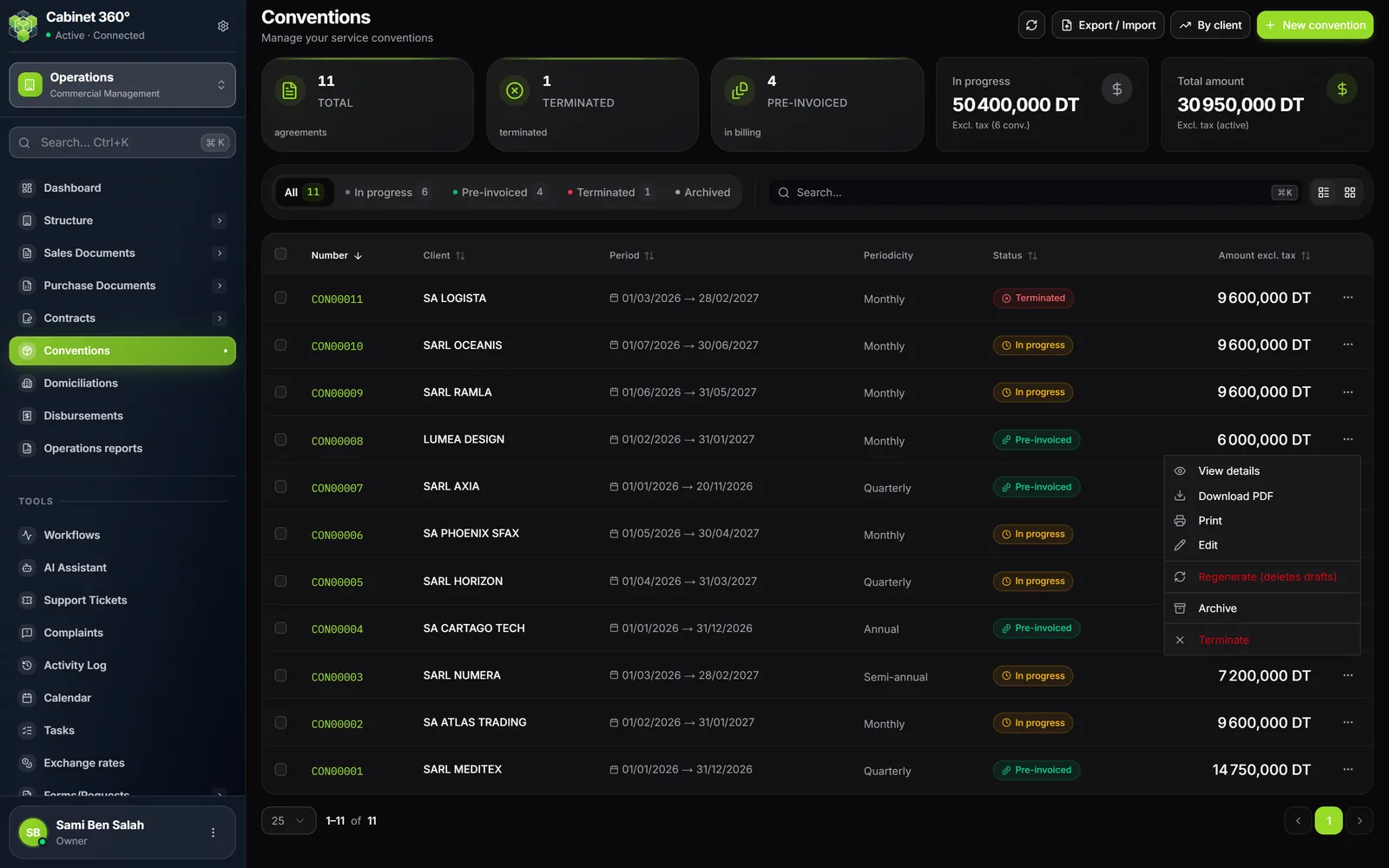
The counters
| Counter | What it counts |
|---|---|
| Total | The conventions in the list, archived ones excluded |
| Terminated | The terminated conventions |
| Pre-invoiced | The conventions whose pre-invoices are generated (“in billing”) |
| In progress | The amount excl. tax of the conventions in progress, and their number |
| Total amount | The amount excl. tax of the pre-invoiced conventions (“Excl. tax (active)”) |
Filtering, searching, sorting
- The tabs: All, In progress, Pre-invoiced, Terminated, Archived. Expired conventions are found under All. Archived ones only appear under Archived.
- The search covers the convention's number, the client's name and the client's number.
- List view or Grid view, as you prefer.
- Columns: Number, Client, Period, Periodicity, Status, Amount excl. tax. A click on a heading sorts the list (all except Periodicity).
A row's “⋯” menu
In order, depending on the convention's status:
| Entry | When |
|---|---|
| View details | Always |
| Download PDF | Always |
| Always (a print template is needed, chapter 2) | |
| Edit | Always offered; refused if the convention is pre-invoiced, terminated or archived |
| Generate pre-invoices | In progress |
| Regenerate (deletes drafts) | Pre-invoiced |
| Reactivate | Terminated or Expired |
| Archive, or Restore | Restore for an archived one, Archive otherwise |
| Terminate | In progress, Pre-invoiced or Expired |
The detail panel
A click on a row opens the “Convention details” panel on the side, without leaving the list. It has two tabs:
- Information: the client, the period, the periodicity, the payment method, the signatories, the amounts and the names of the objects;
- Schedule: the articles of each object and, under “Other”, the custom due dates.
Its Quick actions offer Generate, Download PDF, Print, Edit and Open full page; More actions holds Terminate.
The full record
The record (“Open full page”) shows:
- at the top, the number, the status and a timeline In progress → Pre-invoiced (or a banner “Agreement terminated”, “Agreement expired”);
- the client, the period, the amounts (excl. tax, VAT, incl. tax) and the planned annual increase;
- the convention's objects and the table of their articles: reference, designation, quantity, unit price, VAT, amount;
- the custom due dates (“Other” periodicity) and the special conditions;
- the Document chain, then the convention's History.
The buttons at the top: Edit (as long as the convention is not pre-invoiced, terminated or archived), Generate pre-invoices (In progress), Reactivate (Terminated or Expired), printing, and a menu that holds Download PDF, Regenerate and Archive. Termination is done from the list or from the detail panel.
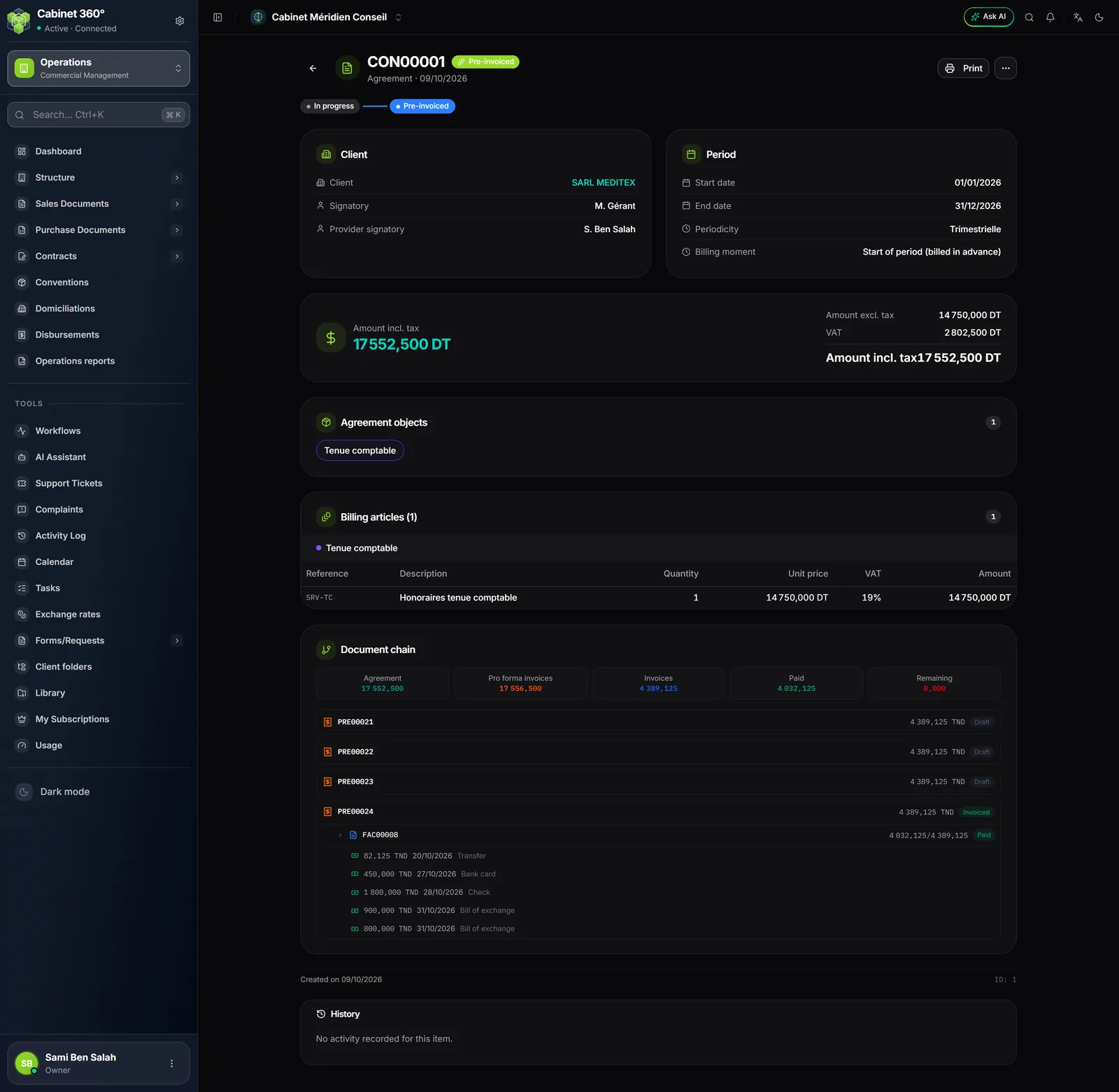
The document chain
Five figures say what the convention has produced:
| Figure | What it adds up |
|---|---|
| Agreement | The convention's amount incl. tax |
| Pro forma invoices | The amount incl. tax of its pre-invoices, stamps included |
| Invoices | The amount incl. tax of the invoices born from its pre-invoices |
| Paid | What has been collected on these invoices |
| Remaining | What remains to be paid on these invoices |
The statuses
| Status | What it means | Can be edited |
|---|---|---|
| In progress | The convention is saved, its pre-invoices not generated yet | Yes |
| Pre-invoiced | Its pre-invoices are generated | No |
| Expired | Its end date has passed without its pre-invoices having been generated | Yes |
| Terminated | It ended before its term | No |
| Archived | Removed from the current list (Archived tab) | No |
A convention cannot be deleted from the screen: you archive it.
Editing
Edit reopens the entry page on the convention, titled “Edit agreement CON…”, with the number and the status below the title. Everything can be changed except the client. The Update button saves and returns to the record. A pre-invoiced, terminated or archived convention shows “This convention can no longer be modified”.
Terminating
Termination ends the contract and clears out its pre-invoices. It is started from the row's “⋯” menu or from More actions in the detail panel, on a convention In progress, Pre-invoiced or Expired.
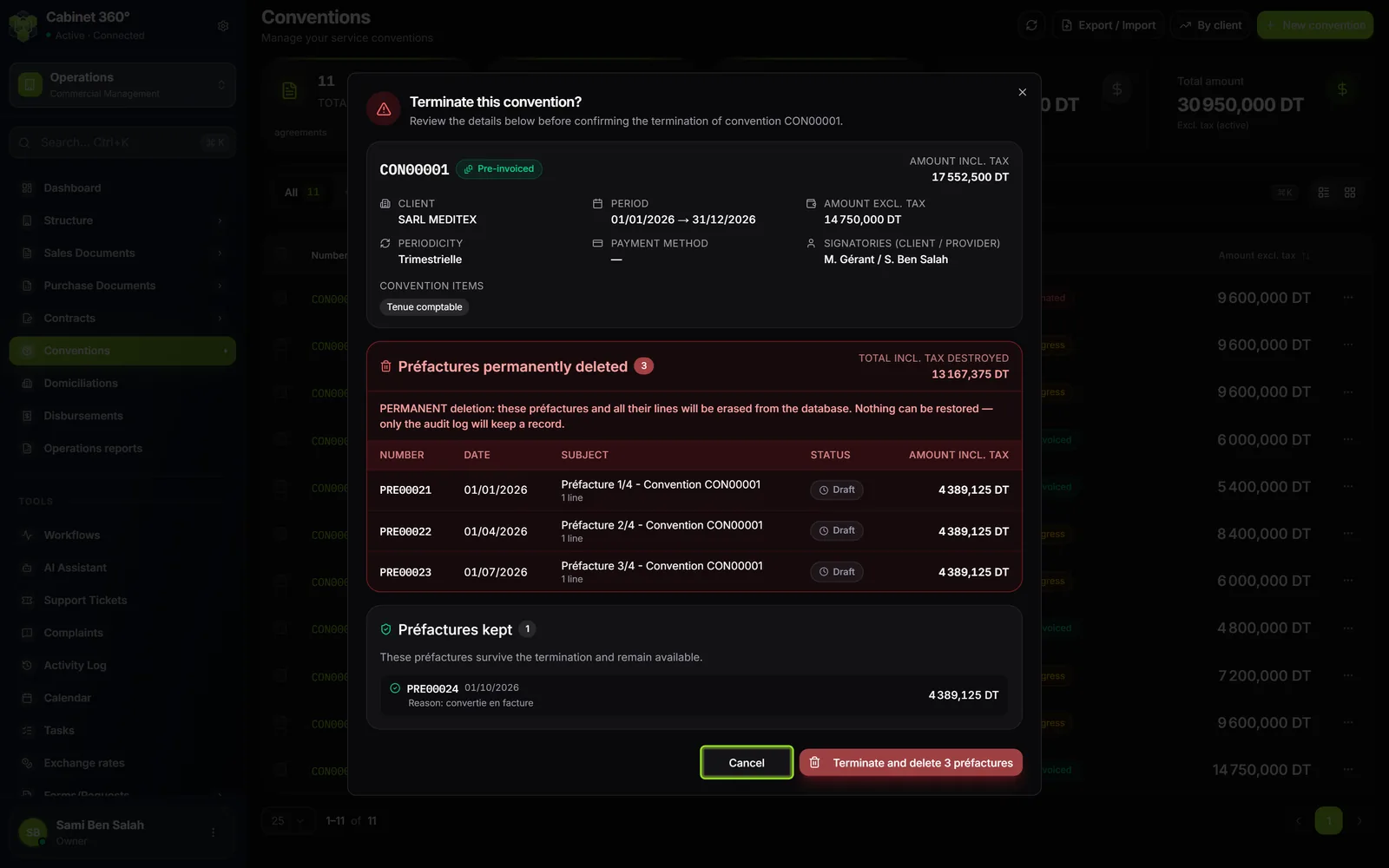
The “Terminate this convention?” window shows everything before you confirm:
- the convention's identity: client, period, amounts excl. and incl. tax, periodicity, payment method, signatories, objects;
- Préfactures permanently deleted: each pre-invoice that will go (number, date, subject, status, amount incl. tax) and the Total incl. tax destroyed;
- Préfactures kept: those that remain, each with its reason.
| A pre-invoice… | Becomes |
|---|---|
| draft, validated or cancelled, never converted nor collected | permanently deleted, with its lines |
| converted into an invoice | kept (“convertie en facture”: converted into an invoice) |
| partly or fully paid | kept (“partiellement ou totalement payée”: partly or fully paid) |
Confirm: the convention becomes Terminated and the message says how many pre-invoices were deleted and how many were kept.
Reactivating
A Terminated or Expired convention can be reactivated: Reactivate puts it back In progress.
- The pre-invoices deleted by a termination do not come back.
- If pre-invoices were kept, the convention will no longer be able to generate (“… a déjà N préfacture(s) …”: already has N pre-invoice(s)): create a new convention instead.
- An expired convention reactivated without changing its end date expires again the following night. Change its period before or after the reactivation.
Archiving and restoring
Archive removes the convention from the current list, whatever its status; it is then found under the Archived tab. Restore puts it back in the list, with the status it had before archiving. Archiving requires the Delete right on the Conventions screen.
Expiry
Every night, IntegraSys moves to Expired any convention In progress whose end date has passed.