
Opening the page
On the “Registered offices” page, click New. The “New domiciliation” page opens; the number will be assigned when you save, by the “Domiciliation” stub. If that stub is not set up, a reminder says so and the Create domiciliation button stays greyed out.
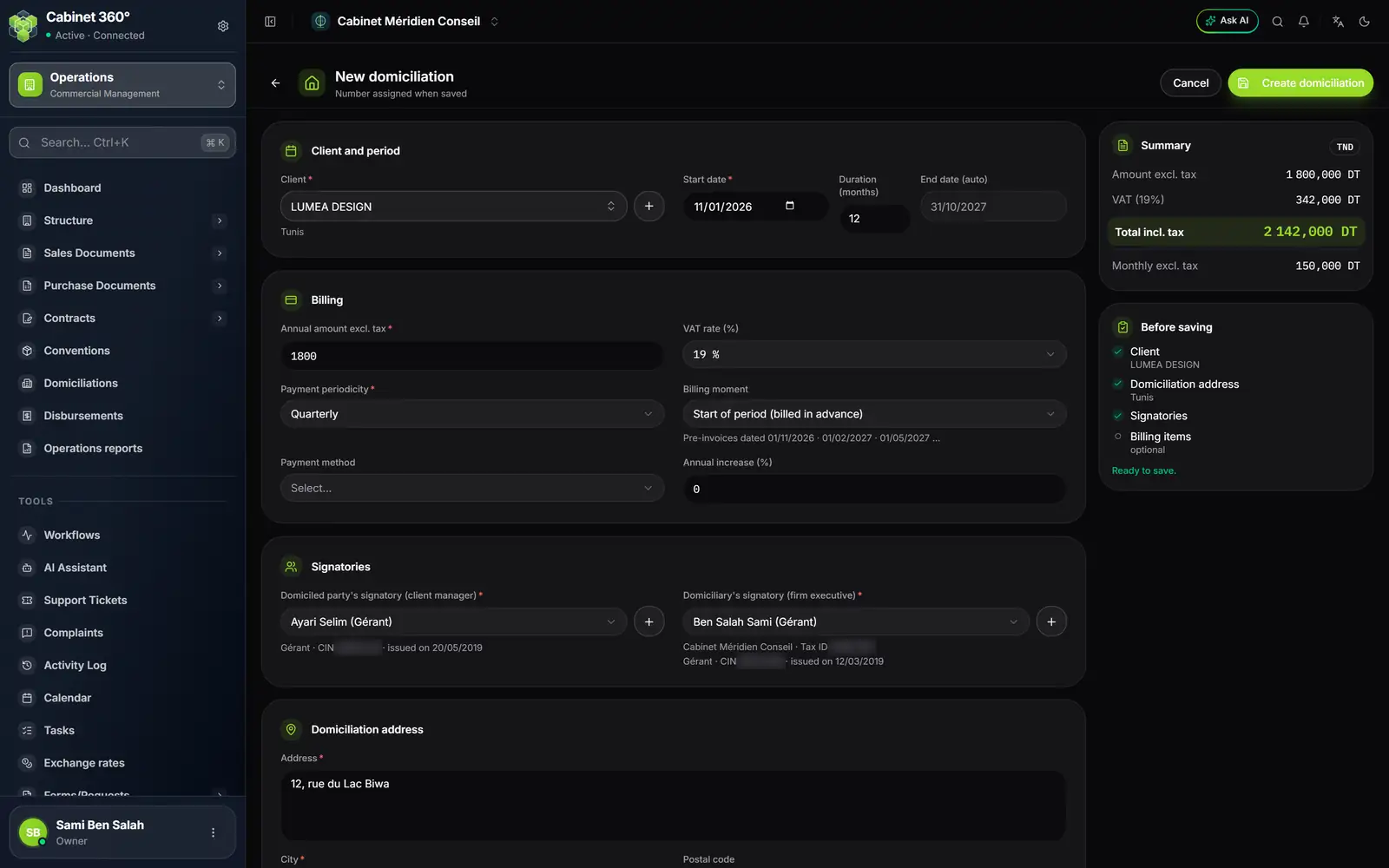
- 1. Client: the “+” creates the missing client, then brings you back.
- 2. Duration (months): 12 by default; the end date follows from it.
- 3. Annual amount excl. tax: the price of one year of domiciliation.
- 4. VAT rate (%): the list of the rates in force.
- 5. The first dates the pre-invoices will carry.
- 6. The client's manager, with their identity document.
- 7. Domiciliation address: suggested from the firm's address.
- 8. Monthly excl. tax: the annual amount divided by 12.
- 9. Before saving: the articles are optional.
Client and period
- Client: choose it; its address shows below. The “+” opens “New client” and brings you back with the client chosen.
- Start date: the first day of the domiciliation.
- Duration (months): 12 by default. An emptied box goes back to 12.
- End date (auto): the start date plus the duration, minus one day. A 12-month domiciliation that starts on 01/11/2026 ends on 31/10/2027.
Billing
- Annual amount excl. tax: the price of one year.
- VAT rate (%): a list of the active rates. A rate the domiciliation already carries and that has been deactivated since stays shown, marked “deactivated”.
- Payment periodicity: Monthly, Bimonthly, Quarterly, Semi-annual, Annual or Other (custom).
- Billing moment: start or end of period, as for the convention, with the preview “Pre-invoices dated …”.
- Payment method: your firm's methods.
- Annual increase (%): applied to the amount when the domiciliation renews itself (chapter 8).
Under Other, the Custom due dates block opens: Add one line per due date (date, amount). Its foot compares Total due dates and Expected (the annual amount excl. tax): they must be equal.
Signatories
Both signatories are mandatory for the domiciliation.
- Domiciled party's signatory (client manager): the list of the client's managers. It waits for the client (“Choose the client first.”); changing the client empties it. Below the name: the capacity, the identity document and its date of issue. The “+” adds a manager to the client's record.
- Domiciliary's signatory (firm executive): your executives, with your company's name and its tax ID. The “+”, reserved for the owner and the administrators, adds an executive.
Domiciliation address
Address and City are mandatory, Postal code is optional. At creation, IntegraSys suggests them from your firm's address: correct them if the client is domiciled elsewhere.
Billing objects
They are optional and detail the price: Add an object brings in the object's articles, as for the convention. Each article's reference and designation are fixed; set its Amount. Below the objects, Total articles excl. tax must equal the Annual amount excl. tax, otherwise the domiciliation is not saved (“Articles total must equal the amount excl. tax”).
Without an article, each pre-invoice will carry a single “Service de domiciliation” line.
Notes, summary, saving
- Notes: remarks or special conditions.
- Summary: Amount excl. tax, VAT, Total incl. tax and Monthly excl. tax.
- Before saving: the client, the domiciliation address, the signatories, the articles (optional) and, under “Other”, the due dates.
Click Create domiciliation. It is saved with the status Pending. As for the convention, if the client already has a domiciliation over a period that touches this one, IntegraSys asks “Do you want to continue?” before creating it.