
The domiciliations list
At the top: Export / Import and New. Then five counters (archived domiciliations do not count in them):
| Counter | What it counts |
|---|---|
| Total | All the domiciliations, and how many are active |
| Active | Those with the status Active, and their share of the total |
| Pending | Those still “To activate” |
| Monthly revenue | The monthly amount excl. tax of the domiciliations with the status Active |
| Total amount | The amount incl. tax of all the domiciliations |
- Status tabs: All, Pending, Active, Pre-invoiced, Suspended, Expired, Terminated, each with its number.
- The search covers the number, the client, the address and the city.
- Columns: Number, Client, Period, Periodicity, Status, Amount excl. tax; ten rows per page, in table view or in grid view.
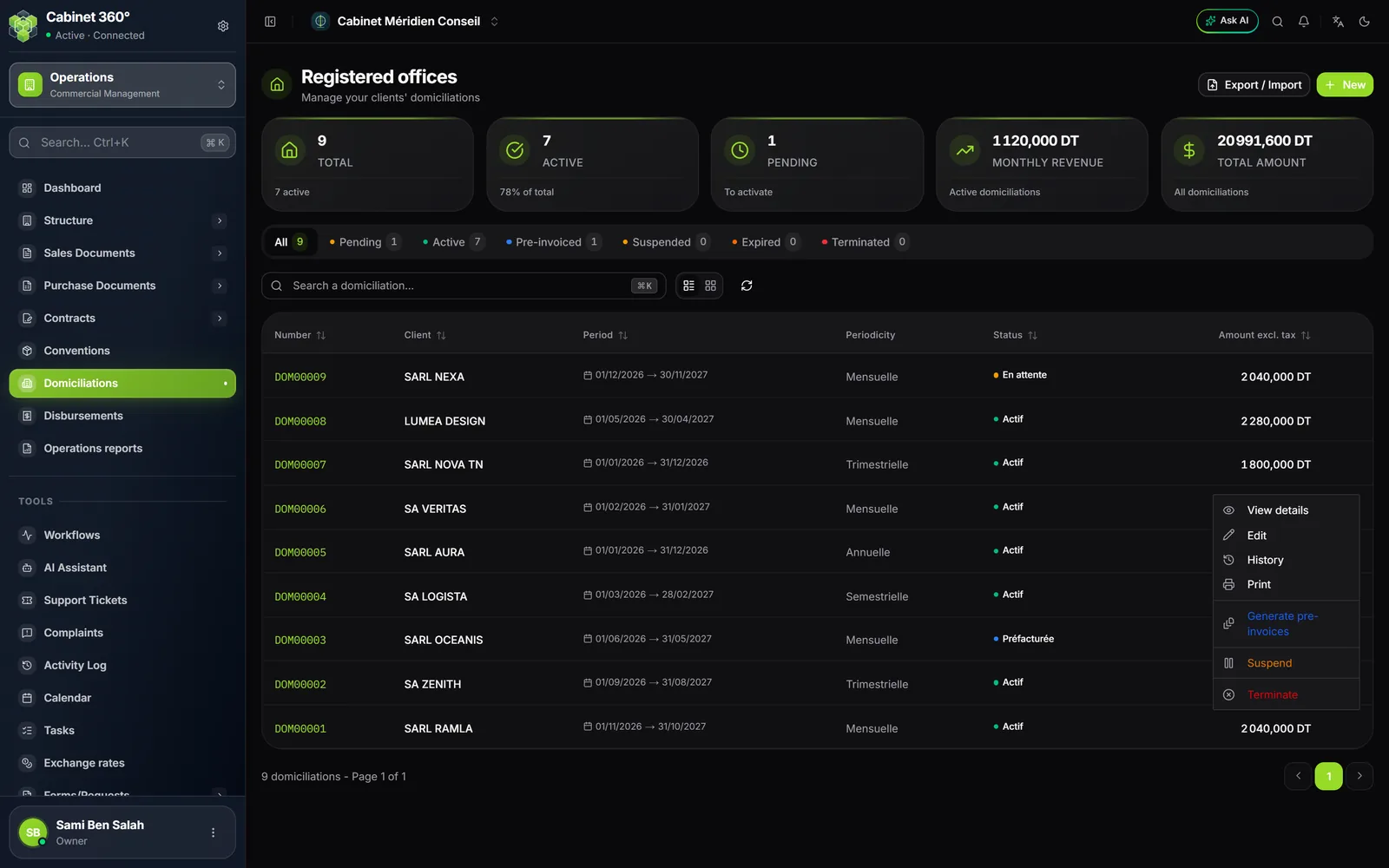
A row's “⋯” menu, in order:
| Entry | When |
|---|---|
| View details | Always |
| Edit | Except Pre-invoiced |
| History | Always (table view) |
| Always (a print template is needed) | |
| Activate | Pending |
| Generate pre-invoices | Active |
| Suspend | Active or Pre-invoiced (table view) |
| Terminate | Except Terminated and Expired |
The statuses
| Status | How it gets there |
|---|---|
| Pending | On saving |
| Active | Activate (from Pending), or an automatic renewal |
| Pre-invoiced | Generate pre-invoices (from Active) |
| Suspended | Suspend (from Active or Pre-invoiced) |
| Expired | At night, once the end date has passed |
| Terminated | Terminate |
Activating, then generating
- Open the domiciliation and click Activate, then confirm. It becomes Active.
- Click Generate pre-invoices. The window recalls the number, the periodicity, the billing moment and the monthly amount, and warns that the domiciliation can no longer be edited.
- Click Generate. The pre-invoices are created and the domiciliation becomes Pre-invoiced.
What the generation produces:
- The number of pre-invoices follows the duration: the duration in months divided by the periodicity's step, rounded up. 12 months monthly: 12 pre-invoices; 12 months quarterly: 4; 6 months monthly: 6. Under “Other”, one pre-invoice per due date.
- The dates follow the calendar, as for the convention: the periods start on the 1st of the month of the start date; the pre-invoice is dated on the first or the last day of its period depending on the billing moment. A last period cut short by the end date stops at the end date.
- The amount: the annual amount excl. tax brought to the duration (a 24-month domiciliation bills two years), shared in equal parts; the remainder to the millime goes on the last pre-invoice. Under “Other”, each pre-invoice carries the amount of its due date.
- The lines: one line per billing article, at the VAT rate on the article's record; without an article, one “Service de domiciliation” line at the domiciliation's rate. A client under a VAT suspension authorisation valid on the pre-invoice's date gets 0%.
- Each pre-invoice: with the status Draft, numbered by the “Pre-invoice” stub, with a subject that reads “Préfacture 1/4 - Domiciliation DOM…”, and your company's tax stamp, on the same conditions as for the convention (chapter 4).
Suspending
Suspend (row menu, table view) moves an Active or Pre-invoiced domiciliation to the status Suspended. Its pre-invoices do not change.
Terminating
Terminate (the “⋯” menu of the row or of the record) ends the domiciliation: its status becomes Terminated and its end date becomes today's date. The confirmation warns that the action cannot be undone.
Expiry, reminder and renewal
Every night, IntegraSys looks at the Active or Pre-invoiced domiciliations:
- during the 30 days before the end date, an “expire bientôt” notification (expires soon) warns the firm, every day;
- once the end date has passed, the domiciliation becomes Expired, and a notification says so;
- a domiciliation marked for automatic renewal goes back to Active for a new duration, starting on the day of the renewal, and its amount excl. tax rises by the planned Annual increase; a notification announces the renewal. An “Other” domiciliation never renews: it expires.
The record
View details opens the record. At the top: Edit (except Pre-invoiced), Activate (Pending), Generate pre-invoices (Active), Print, and the “⋯” menu (History, Terminate). A timeline shows Pending → Active → Pre-invoiced, or a banner “Domiciliation suspended”, “Domiciliation expired”.
The cards: the client and its number, the domiciliation address, the Domiciliataire (provider) and the Domiciled (client) (name, capacity, identity document), Period and payment (dates, duration, periodicity, billing moment, planned annual increase), the amounts (monthly excl. tax, annual excl. tax, VAT, incl. tax), the custom due dates, the included services, the notes, the recent history and the mail received.
The history
History opens the “Change log”: each creation, edit, activation, suspension, termination, pre-invoice generation and annual increase, with its date, its description, the user and the detail of the fields changed (“Amount excl. tax: 1 200,000 DT → 1 260,000 DT”).
The rights
| Action | Right on the Domiciliations screen |
|---|---|
| See the list, the record, the history; print | View |
| Create; activate, generate, suspend, terminate; import | Create |
| Edit | Edit |