What the analysis does
The analysis is done client by client, year by year, in the client's accounting file. The ratios are no longer a separate module: they are part of Accounting, at no extra charge. For one client and one fiscal year, the Financial ratios group:
- reads the financial statements of the file, those that the client's accounting already generates: assets, equity and liabilities, income statement, cash flow statement, intermediate management balances. Those of the year and those of the previous year. No trial balance to import, nothing to take over or type again;
- adds the few figures the statements do not give: the headcount, the VAT rate, some third-party balance totals;
- computes the ratios of six families (liquidity, structure, profitability, activity, growth, third-party analysis) and compares the year with the previous one;
- gives each ratio a status: Good, To watch or Critical, with an interpretation and a recommendation;
- sums it all up in a score out of 100 and a named risk level;
- lays the analysis out in an A4 report of seven to nine pages, in the colours of the client's logo, to print as PDF or export to Word.
The four screens of the group
The Financial ratios group is in the menu of the accounting file, right after Financial statements. You open the client's file, choose the fiscal year, then unfold the group (chapter 2). It has four screens, in this order:
| Screen | What you do there |
|---|---|
| Dashboard | Read the result: score, risk, six key figures, charts, alerts and recommendations. |
| Additional information | Enter the headcount, the VAT rate and, if needed, third-party balance totals. |
| Ratio generation | Compute the analysis and read each ratio, family by family. |
| Analysis report | Review, print or export the report handed to the client. |
The financial statements have no screen in the group: the ratios read those of the file, in the Financial statements group (chapter 4).
The first time, follow the order of the work rather than the order of the menu: the file's financial statements, additional information, generation, then dashboard and report.
Computing means saving
A single button computes the analysis: Generate the ratios the first time, Recalculate afterwards. It is in Ratio generation; the empty dashboard offers the same one. In one go, IntegraSys reads the financial statements and the additional information again, computes each ratio, its status, the score and the risk, then saves the analysis.
The dashboard, Ratio generation and the report read this saved analysis. They never recompute on their own.
What you need before you start
| You need | Why | Without it |
|---|---|---|
| The Accounting module in the firm's subscription | The ratios are part of it, at no extra charge: they open in the accounting file. | Without Accounting, there is no accounting file to open, so no ratios. |
| The right to view the accounting files and their fiscal years | To open the client's file and choose the fiscal year. | The file does not open. |
| The View right on the ratio screens | To read the analysis. | The Financial ratios group leaves the file's menu and its screens do not load the analysis. |
| The Create right on the ratio screens | To compute and save: analysis, information. | The server refuses to save. |
| An accounting file for the client, with Bookkeeping in the Active services of the client record | The ratios open in this file. | The client is not in the list of files. |
| An FS template and a Template type on the accounting file | The financial statements are built on this template. | « Aucun modèle d'états financiers n'est associé au dossier comptable (configurez le secteur / type dans la fiche comptable du client). » (no financial statements template is linked to the accounting file). |
| A fiscal year with entries | The ratios read the statements of that year. | "Données indisponibles pour cet exercice." (data unavailable for this year). |
| The previous fiscal year, with its entries | For the N-1 column, the changes and the growth ratios. | No comparison; some ratios stay empty. |
| The client's logo on the client record (Client logo block) | The cover page and the colours of the report. | The first three letters of the name and IntegraSys green. |
Rights are given in Team, role by role (see the book "Firm settings"). The accounting file, its financial statements template and its fiscal years are set in the Accounting module (see the book "Accounting & Financial Statements").
The ratio catalogue in Settings
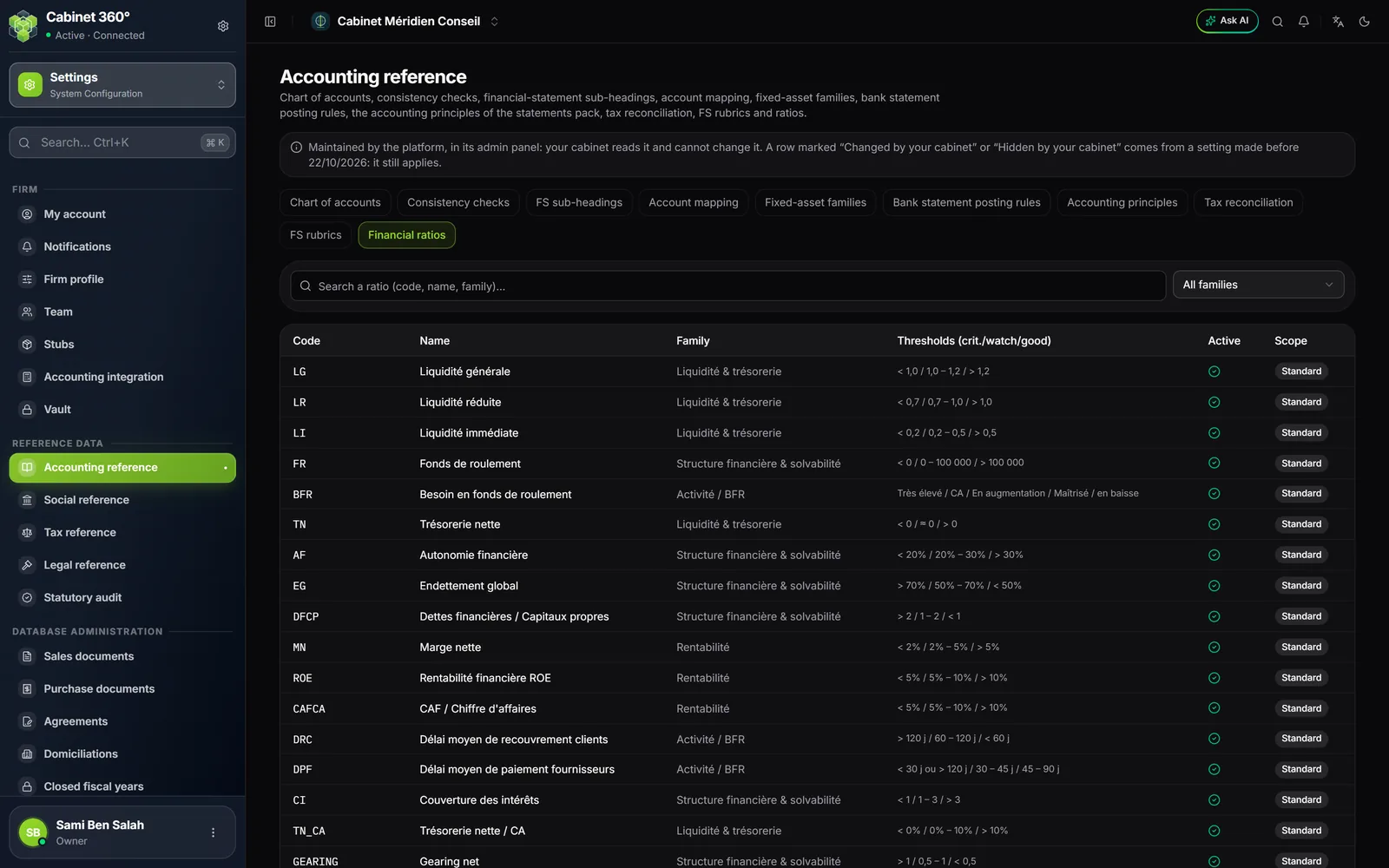
The list of ratios, their formulas and their thresholds are kept by the IntegraSys platform, for every firm. Your firm reads them here:
Open the Financial ratios tab. For each ratio the table gives its Code, Name, Family, Thresholds (crit./watch/good), the Active column and the Scope. Search with Search a ratio (code, name, family)… or filter one family.
- The thresholds decide each ratio's status: chapter 7 explains how (The ratios one by one).
- A ratio whose Active column is off is not computed.
- The page says: "Maintained by the platform, in its admin panel: your cabinet reads it and cannot change it." A row marked "Changed by your cabinet" or "Hidden by your cabinet" comes from a setting made before 22/10/2026: it still applies.