
Who sees what
My Subscriptions is in the Tools group, at the bottom of the menu. The screen opens to the owner, the administrators and members whose role opens it.
Only the owner and administrators buy and renew. The others read, at the top of the page, « Ask an administrator ».
Reading your modules
At the top of the page: « Your modules, when they end and what you can add. », the number of Active modules, and the My purchases and Usage buttons. Below, Next end date names the module that needs action soonest, with its date and price; on a computer, a timeline places each end on the year ahead.
Then come, in this order: the table of your modules, Packs, More capacity, Add a module, and a Need more? card.
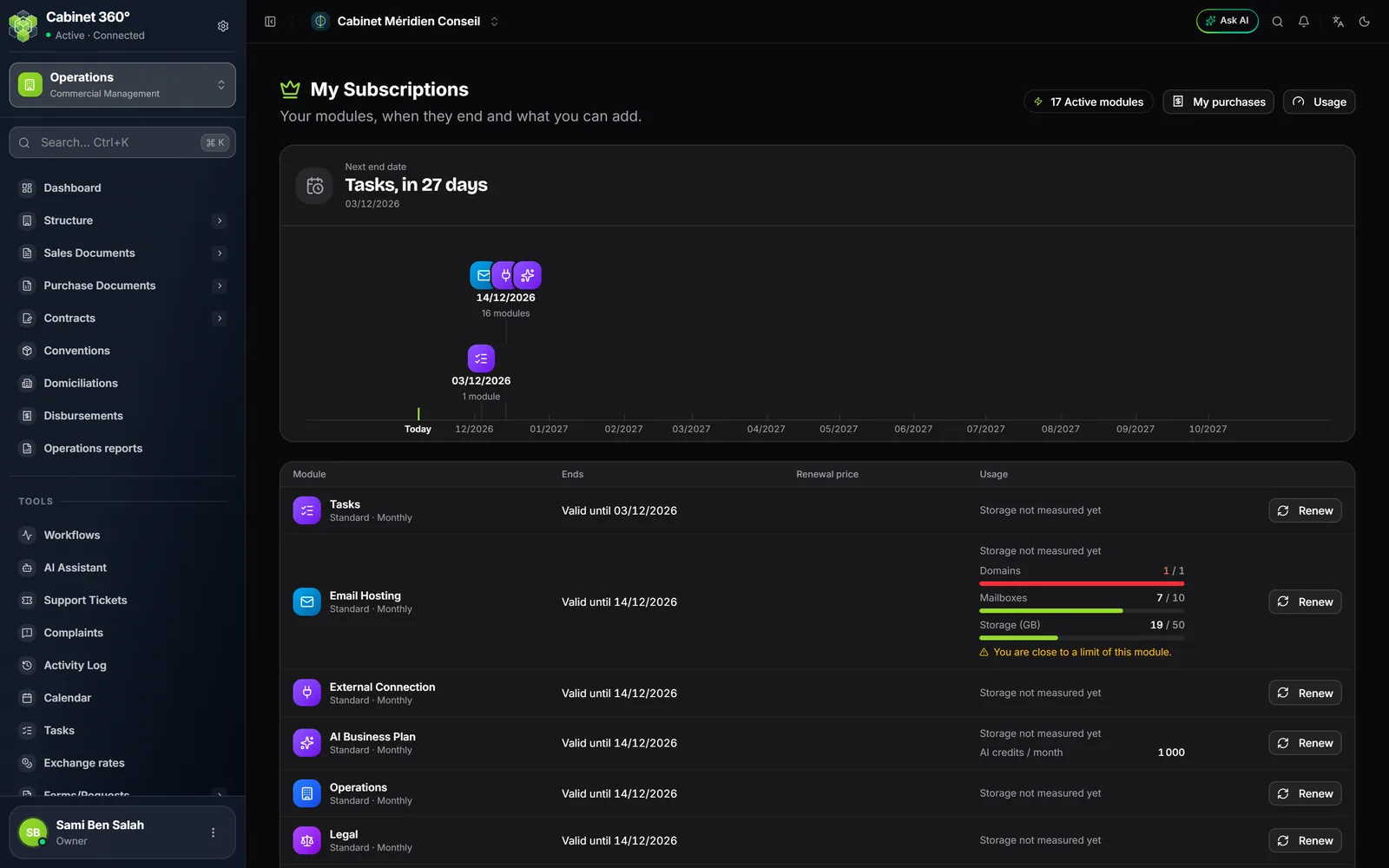
The table shows one line per module, starting with what needs action: expired, trial ended, suspended, cancelled, ending within 7 days, trial, then the rest by date. Its columns: Module, End, Renewal price, Usage. Each line gives:
- the plan and the cycle, for example Standard · Yearly;
- the end: valid until a date, ending in a few days, trial with days left, starting on a date, expired on a date, suspended, cancelled or with no end date;
- the Renewal price, excluding VAT (none for a module with no end date);
- the Usage: the storage used by the module, for example 96,0 MB used out of 500,0 MB, and its limits when it has any, for example mailboxes « 8 / 10 »;
- the button: Renew, or Buy for a trial. A module with no end date, or one that has not started yet, has none.
The usage bar turns orange at 80 % of a limit and red at 100 %. From 80 %, the line warns that you are getting close to one of the module's limits, and a banner repeats it at the top of the pages; at 100 %, it says the limit is reached.
A suspended module, or one no longer sold, is settled with the IntegraSys team: its line offers Contact us.
Packs
When the firm has all the modules of a pack with the same end date, the pack reads as a single line, for example Pack Business. Renew the pack opens the payment with all its modules, at the pack's price.
If one of its modules has another end date, each module keeps its own line, and renewing one module alone costs its own price.
The Packs block lists the catalogue's packs and their price excluding VAT. Yours carries Your pack; a smaller one it contains, Included in your pack; a pack that contains a module you already have with no end date, no button; the others, Choose this pack. Choosing a pack extends the modules you already have from their end date: nothing is deducted from what has been paid.
Adding a module
The Add a module block lists the modules the firm has never had, with their price excluding VAT. An expired module is renewed from the table. The Monthly and Yearly tabs, on the line of the Packs title, change the prices of packs and modules, and the cycle offered.
- Choose Monthly or Yearly.
- On the module's line, click Add. The Complete your subscription page opens, with this module and your firm already chosen.
- Check that the Company receiving this subscription list does show your firm.
- Tick the box accepting IntegraSys's general terms and conditions.
- Click Pay by bank card or Pay with Flouci, then pay on Flouci's secure page.
- Back on IntegraSys, the page shows « Payment confirmed ». The module appears in My Subscriptions and in the menu.
The added module has its own period, 1 month or 12 months from the payment: it is not aligned with the end date of your other modules.
Renewing
Click Renew on the module's line (Renew the pack for a pack), or in the banner. The payment page opens with this module, the cycle of your last payment and your firm. Paying before the end extends access from the end date: you lose no days.
More capacity
The More capacity block shows storage, AI credits, your collaborators and, if you have hosted e-mail, your mailboxes and domains. Its prices exclude VAT; VAT is added at payment.
- Collaborators and Mailboxes: when IntegraSys offers them, each pack has its button, for example « +5 collaborators, 1 year », with its duration and price. When they are on sale with no pack ready, Contact us.
- Storage and AI credits: they can only be bought when a limit applies to your firm; otherwise the card says there is nothing to buy (« Measurement only » for AI credits).
A capacity pack lasts 1 month or 1 year, with no renewal. When it ends, nobody is cut off and nothing is erased: your limit comes down, and while you are above it, you can no longer invite a collaborator or create a mailbox. Renew on its line chains a new pack to the end of the current one.
My purchases and your invoices
My purchases lists the orders placed with your own account. Each line gives the reference, the date and the firm, the payment status (paid, awaiting payment, failed, expired, cancelled, refunded), the activation status and the amount including VAT. If a colleague paid, the order appears in their purchases.
Open at the end of an order shows the detail: subtotal excluding VAT, VAT, total including VAT, status and the date up to which the period paid is valid. An order for a multi-firm pack that still has free places shows Assign: choose the firm for each place before the date shown.
A paid order carries an Invoice FP-… button (for example FP-2026-00001): it downloads IntegraSys's invoice as PDF, with the amount excluding VAT, the VAT and the total of each line. It is also sent to you by e-mail. A refund gives a Credit note AV-…, in the same place. As long as the line says the invoice is being prepared, it has not been issued yet.
Usage: each module's storage
Usage (at the top of My Subscriptions, or in Tools) gives each subscribed module its card: its storage used out of 500,0 MB, or out of 2,0 GB for Accounting, its files and its data. Modules do not add up: each keeps its own space. When your pack states a storage amount, its modules share one total, shown by the Your pack's storage card. The page gives the date of the last measurement, and whether going over blocks anything or not.
Further down, AI credits shows what the firm's AI used over the last 30 days, by feature and by person.